From Receipt Submission to Petty Cash Reimbursement
How finance teams can connect expense claims, receipt checks, approvals, payments, accounting entries and petty cash reconciliation in one controlled workflow.

Xian Hui
3 August 2026
Quick answer
How can petty cash reimbursement be automated?
A controlled reimbursement workflow captures the claim and receipt, compares their details, applies the organisation's policy and routes exceptions to the appropriate reviewer. After approval, it prepares the payment and accounting entry, links them to the supporting records and reconciles the petty cash balance or reimbursement payable.
From Receipt Submission to Petty Cash Reimbursement
Low-value claims can consume disproportionate finance time. Each request still needs evidence, policy checks, coding, approval, payment, recording and, where cash is involved, reconciliation.
The work becomes slow when employees submit claims through paper forms, email or messaging applications. Finance then has to assemble the receipt, explanation, approval and payment record before it can close the transaction.
Why does the reimbursement process matter?
A reimbursement process must do more than repay the employee. It must preserve the supporting record, show who approved the expense and connect the payment to the accounting entry.
The Inland Revenue Authority of Singapore's record-keeping requirements and the accounting-record provisions in the Companies Act 1967 provide the wider record-keeping context. The practical workload sits in collecting and connecting the evidence for each claim.
A weak process leaves finance with familiar gaps:
- a receipt without a clear business purpose
- an approval separated from the claim
- a payment without the final account coding
- an accounting entry without accessible support
- a petty cash balance that does not agree with the physical count
These gaps also affect adjacent work. Reimbursement data may feed a controlled month-end closing workflow, while an equipment purchase may need to enter the fixed asset register.
Why do forms and accounting software not solve the whole problem?
An online form improves collection, but it does not necessarily read the receipt, test the claim against policy, identify possible duplicates or determine the approval route. Finance still has to move the submitted information through the remaining steps.
Accounting software records the transaction, but the work begins before posting. The employee must submit the claim, the approver must decide whether to accept it and finance must resolve exceptions before preparing the payment and entry.
A separate expense application may cover submission and approval while leaving payment preparation, accounting and petty cash reconciliation elsewhere. The break between systems creates another handover and another set of statuses to maintain.
The useful unit is therefore the complete claim record: request, receipt, checks, decision, payment, posting and reconciliation. Each stage should build on the same information rather than recreate it.
What should a controlled expense claim contain?
The workflow begins with a structured request. It captures the employee, expense date, merchant, amount, currency, business purpose, cost allocation, payment details and supporting document, then prevents an incomplete claim from entering the normal approval queue.
Receipt extraction reads the available merchant, date, document number, subtotal, tax, total and currency. The workflow compares those values with the employee's submission and flags differences without deciding which value is correct.
A claim for S$48.20 against a receipt showing S$42.80 should return to the employee or enter an exception queue. The original receipt remains attached throughout the review.
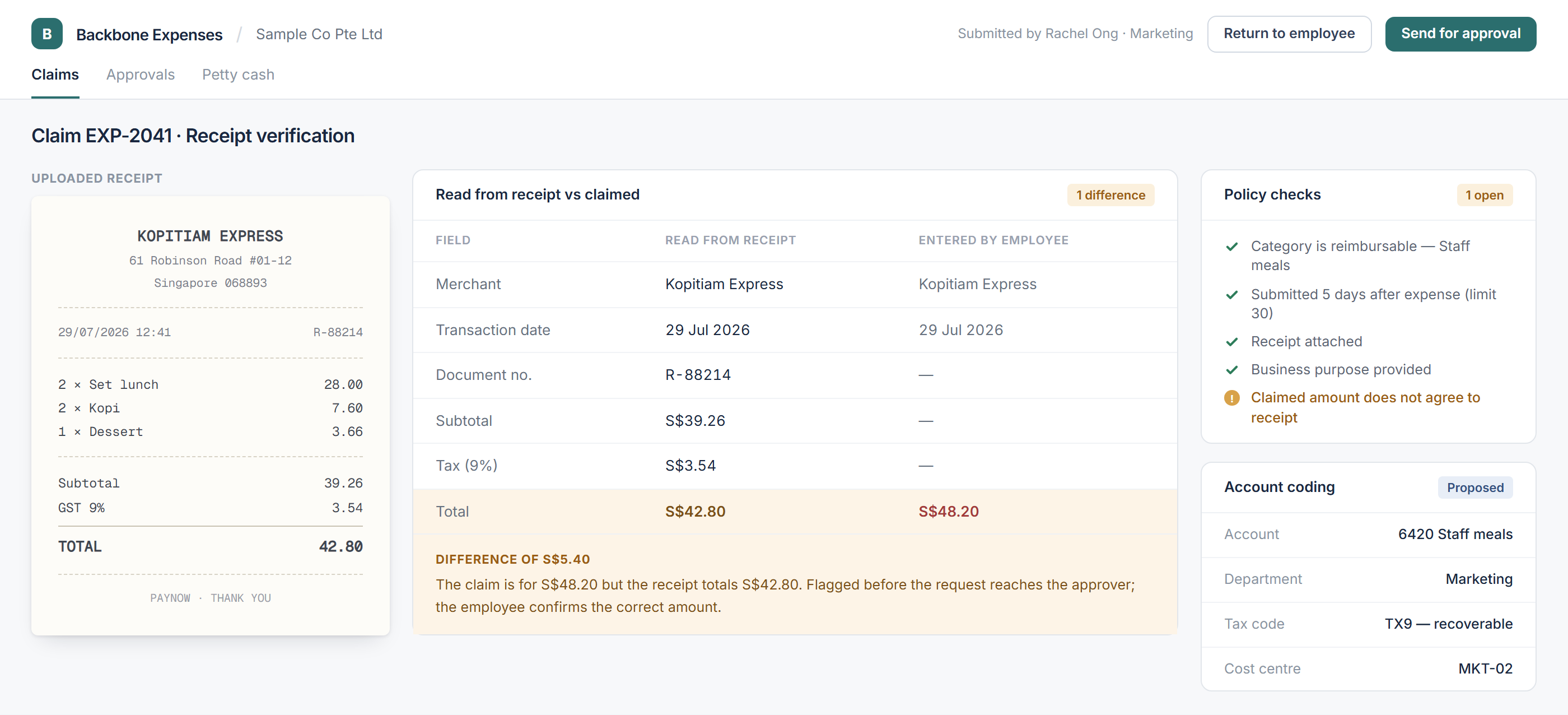
The workflow also applies the organisation's configured rules and searches for possible duplicates. It can compare employee, merchant, date, receipt number, amount, currency, description and receipt image, then present likely matches to finance.
| Stage | System preparation | Human decision |
|---|---|---|
| Submission | Checks required fields and documents | Employee confirms the claim |
| Receipt review | Extracts values and identifies differences | Employee or finance resolves them |
| Policy check | Applies configured limits and conditions | Approver decides on exceptions |
| Duplicate check | Presents possible matching claims | Finance determines whether duplication exists |
| Coding | Proposes account, tax code and allocation | Finance confirms or amends the entry |
| Payment | Prepares the instruction or batch | Authorised employees release funds |
| Reconciliation | Compares the register with the cash count | Finance investigates differences |
How should approval and payment remain controlled?
Approval routing should use the organisation's own rules. The employee, department, amount, category, project, cost centre and policy exceptions can determine who reviews the claim and whether another approval is required.
The reviewer needs the claim, receipt, business purpose, policy results, duplicate warning and proposed coding in one view. They can approve, reject or return the request, while the workflow records the decision and date.
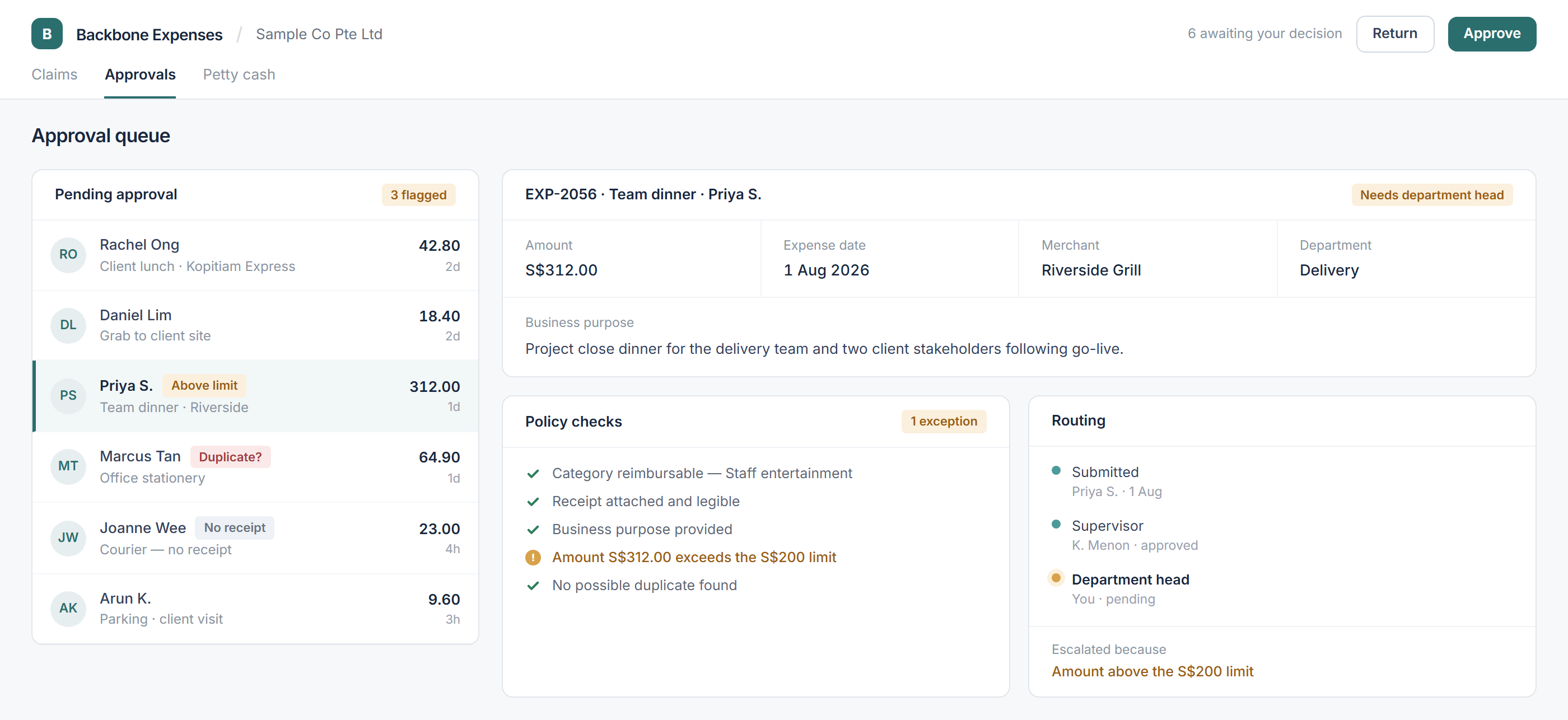
After approval, the workflow prepares the payment instruction or adds the claim to a batch. It can pass approved reimbursements into a bank-ready payment file workflow, but an authorised employee still reviews and releases the payment.
The proposed accounting entry uses the approved claim details and configured rules. Finance confirms the account, tax code, cost allocation and clearing account before posting, and the final entry remains linked to the claim and receipt.
How is physical petty cash reconciled?
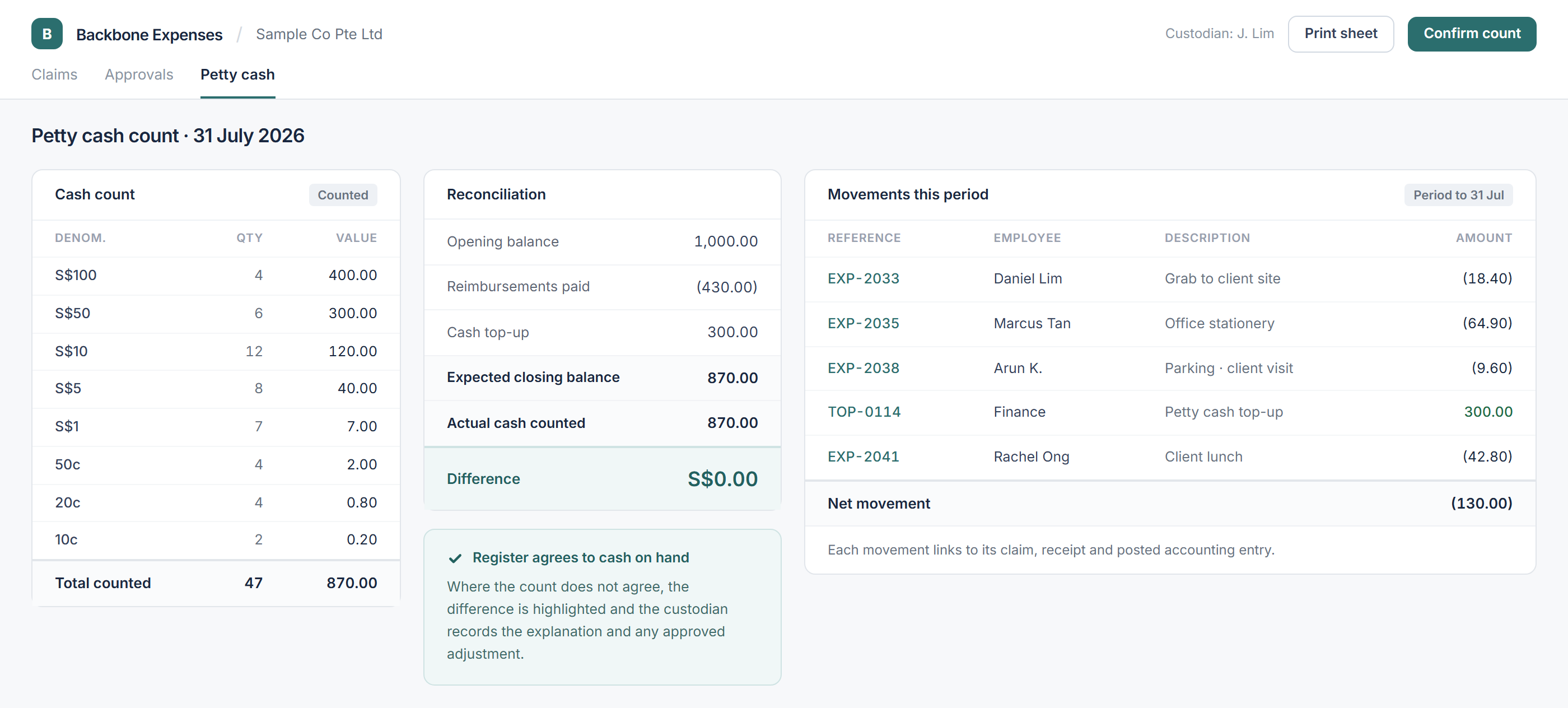
Where an organisation pays claims from physical cash, the register must reflect reimbursements and top-ups as they occur. Delayed updates make the eventual count harder to explain because finance must reconstruct the movements.
The reconciliation is mechanical:
| Petty cash movement | Amount |
|---|---|
| Opening balance | S$1,000 |
| Reimbursements paid | (S$430) |
| Cash top-up | S$300 |
| Expected closing balance | S$870 |
| Actual cash counted | S$870 |
| Difference | S$0 |
The workflow compares the expected closing balance with the cash counted. If they differ, it keeps the item open until the custodian records an explanation and finance approves any adjustment.
How does the connected workflow operate?
The system performs a defined sequence:
- Capture the claim and supporting document.
- Extract receipt details and compare them with the submission.
- Apply policy rules and search for possible duplicates.
- Propose coding and route the claim for approval.
- Prepare the payment after approval.
- Post the confirmed accounting entry and reconcile the relevant balance.
Exceptions remain visible at the stage where they arise. Finance can focus on missing receipts, conflicting amounts, policy departures, duplicate warnings, overdue approvals, unpaid claims and reconciliation differences instead of rechecking every standard submission.
Backbone helps accounting teams connect expense claims, approvals, payments, accounting entries and petty cash reconciliation in one controlled workflow — while keeping expense responsibility and payment authority with the organisation.
Frequently asked questions
This information has been prepared for general informational purposes only and is not intended to be relied upon as accounting, tax, or other professional advice.
Related articles
case-studies
From Property Management System Data to Reconciled Hotel Accounts
How hotel finance teams connect property management, payment, settlement and ledger data to reconcile revenue, guest balances and receipts.
case-studies
From Headcount Plan to Payroll Forecast
How finance and people teams can maintain an employee-level payroll forecast as hiring, compensation and employer-cost assumptions change.
case-studies
From Historical Cash Movements to a Rolling Cash Flow Forecast
How finance teams connect bank balances, receivables, payables and planned commitments to maintain a rolling cash flow forecast.