From Month-End Tasks to a Controlled Closing Workflow
How finance teams can connect close dependencies, source data, reconciliations, journals, exceptions and approvals in one controlled month-end workflow.

Xian Hui
7 August 2026
Quick answer
How can an AI agent help with month-end closing?
An AI-assisted month-end close workflow tracks dependencies, checks whether source data has arrived, prepares routine reconciliations and journals, and routes exceptions for review. It updates the close status as work progresses and reopens affected tasks after late adjustments, while finance retains responsibility for accounting judgements and final approval.
From Month-End Tasks to a Controlled Closing Workflow
The month-end close turns the period’s transactions and adjustments into information that management can use. Delays or unresolved differences weaken that information because reports may be prepared from an incomplete ledger or unsupported balances.
The work spans reconciliations, accruals, recurring journals, intercompany balances, variance review and approval. These tasks depend on one another, so one missing payroll report or unresolved bank item can hold up several later steps.
A controlled workflow connects the sequence, evidence and review points. It prepares repeatable work and keeps the finance team focused on exceptions and accounting decisions.
Why does the month-end close become difficult to coordinate?
Close information comes from the general ledger, banks, payroll, billing, expense platforms, operational systems and supporting documents. Different employees own these sources, and the data does not always arrive in the order required.
The finance manager must therefore track more than completion dates. They need to know whether the underlying data is complete, whether a reviewer has approved the work and whether a late adjustment has invalidated a completed reconciliation.
Typical dependencies include:
- bank data before cash reconciliations
- payroll reports before payroll journals and liability reconciliations
- entity balances before intercompany matching
- completed reconciliations and journals before balance sheet review
A delay near the start of this sequence can block the reporting pack. Without a current view of dependencies, staff spend time chasing updates and may begin work using incomplete information.
Why does the existing checklist or ledger not solve the problem?
A spreadsheet checklist can show an owner, deadline and reported status. It does not normally retrieve source data, test whether the data is complete or determine which completed tasks a late journal has affected.
The ledger holds postings but not every dependency outside it. Payroll reports, bank statements, merchant records, explanations and approvals may remain in separate systems, folders or email threads.
Dedicated closing software can model this sequence. For example, SAP documents predecessor and successor dependencies that prevent a task from proceeding before its prerequisites finish. The mechanical problem remains where a finance team has only a ledger and a manually maintained checklist, or where the closing tool does not connect the required sources and preparation work.
Control also requires more than marking tasks complete. The COSO internal control framework treats control activities, information, communication and monitoring as connected components. A close workflow needs the same connection between preparation, evidence, review and follow-up.
What must a controlled close record?
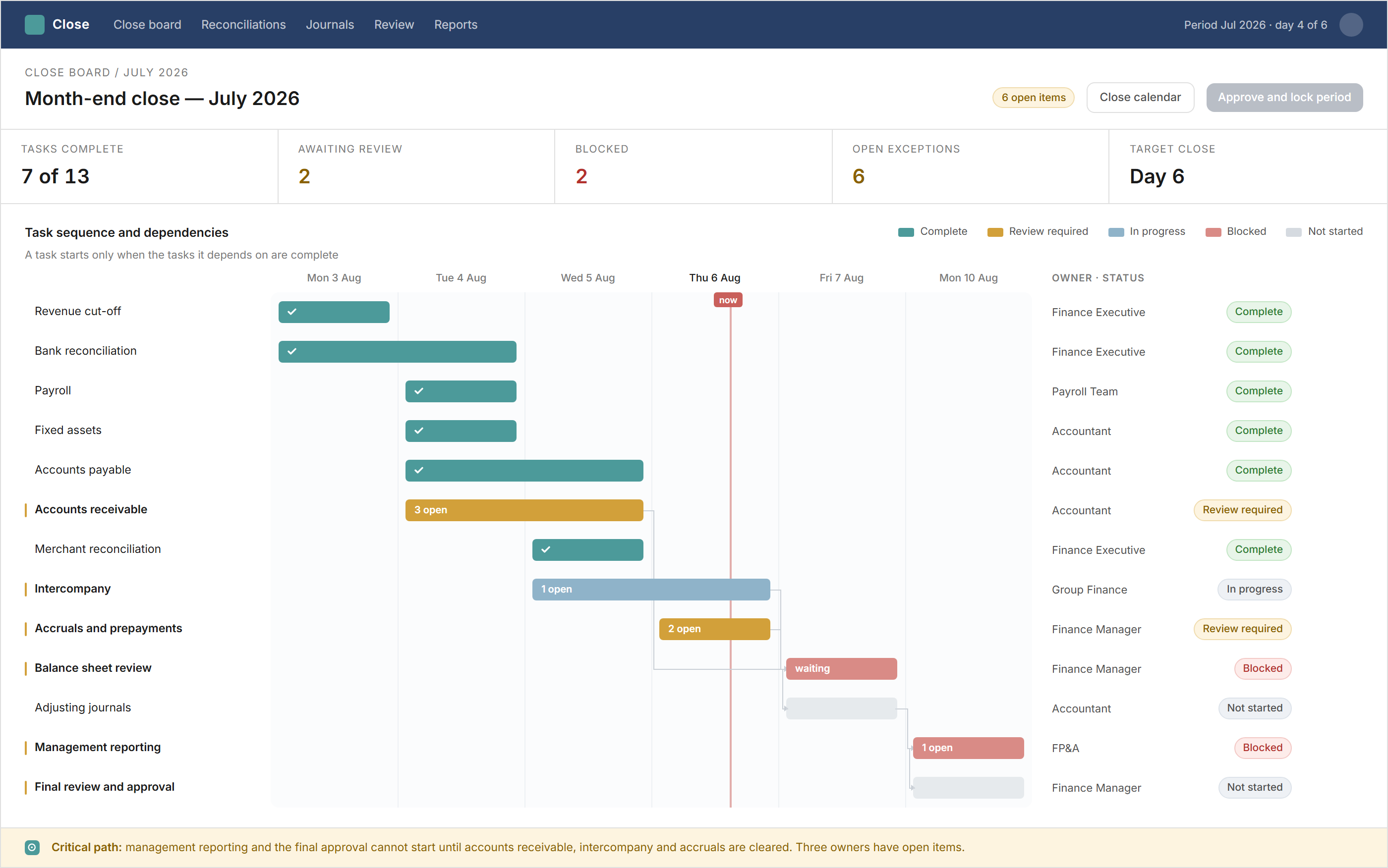
Each closing cycle starts from a reusable task structure. The workflow creates the period’s tasks and assigns the owner, reviewer, due date, dependency, required evidence and completion criteria.
| Close record | What it controls |
|---|---|
| Task and owner | Responsibility for preparation and follow-up |
| Dependency | The work that must finish before the task can start |
| Source and evidence | The records used to prepare or support the task |
| Exception | The difference, missing item or decision still outstanding |
| Review and approval | Who checked the work and when |
| Final status | Whether the task is complete, blocked or reopened |
The board shows which tasks can proceed and which are holding up the close. It also keeps the evidence and decisions against the relevant task instead of leaving them across messages and folders.
How does the workflow prepare the closing work?
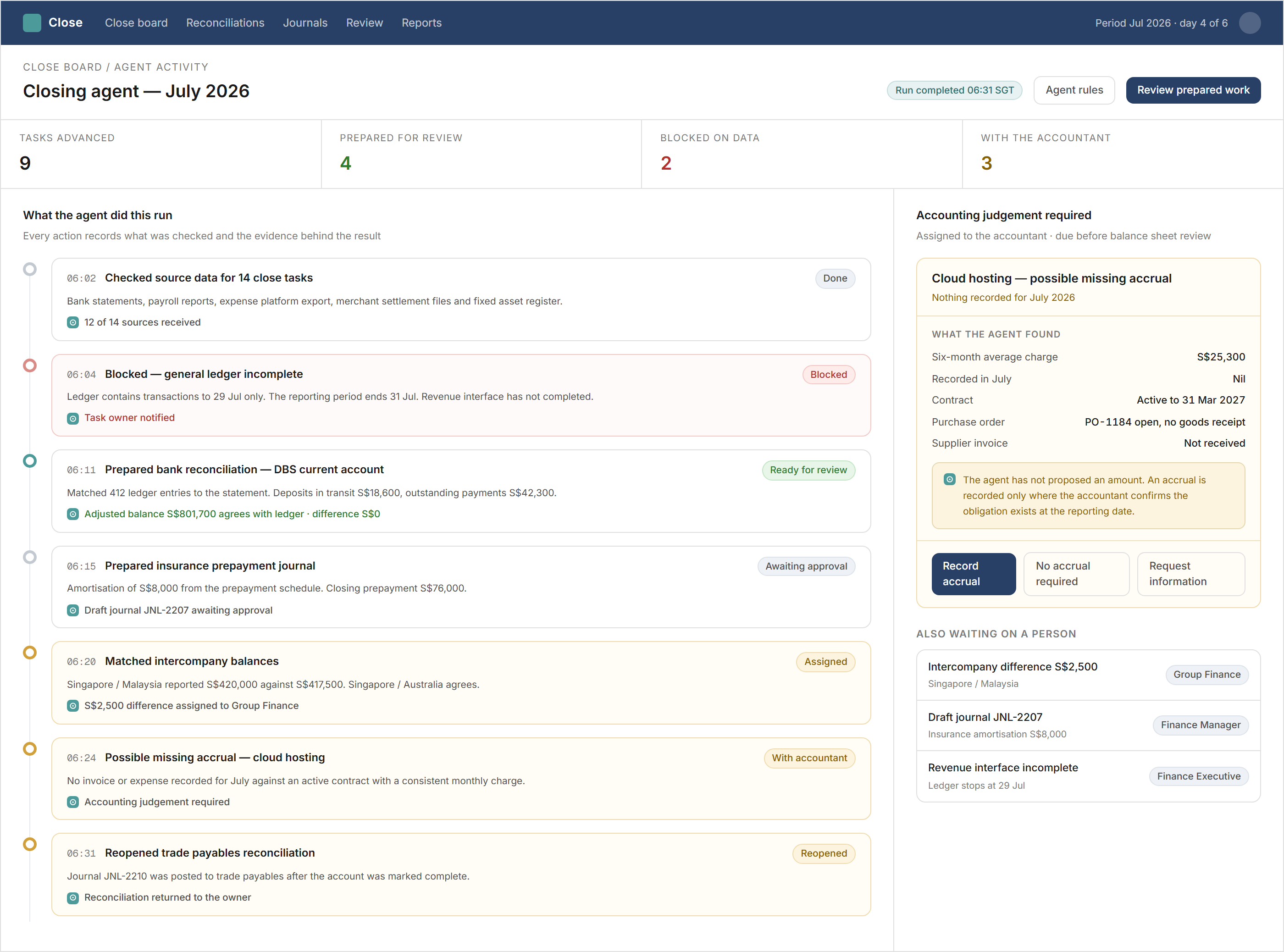
Before starting a task, the workflow checks whether the expected files or connected-system data have arrived. It can test the reporting period, opening balance, transaction sequence, imported total and duplicate status before an accountant begins the reconciliation.
For a bank reconciliation, it retrieves the ledger balance, statement transactions and prior outstanding items. It matches the records, carries forward valid reconciling items and presents the remaining differences for investigation. A business receiving card or platform payments can apply a separate merchant settlement reconciliation before the resulting balance feeds the close.
The same process prepares recurring journals from approved schedules. Depreciation, prepayment amortisation, payroll and other repeatable entries remain in draft until the designated reviewer approves them.
The workflow can also identify possible missing accruals by comparing the current period with previous months, contracts, purchase orders, goods received and supplier invoices. It gathers the supporting records and asks the accountant to decide whether an entry is required.
For intercompany work, the system compares balances between entities, assigns differences and tracks agreement by both sides. Those resolved balances can then feed the group’s consolidation packages.
How are exceptions and late adjustments controlled?
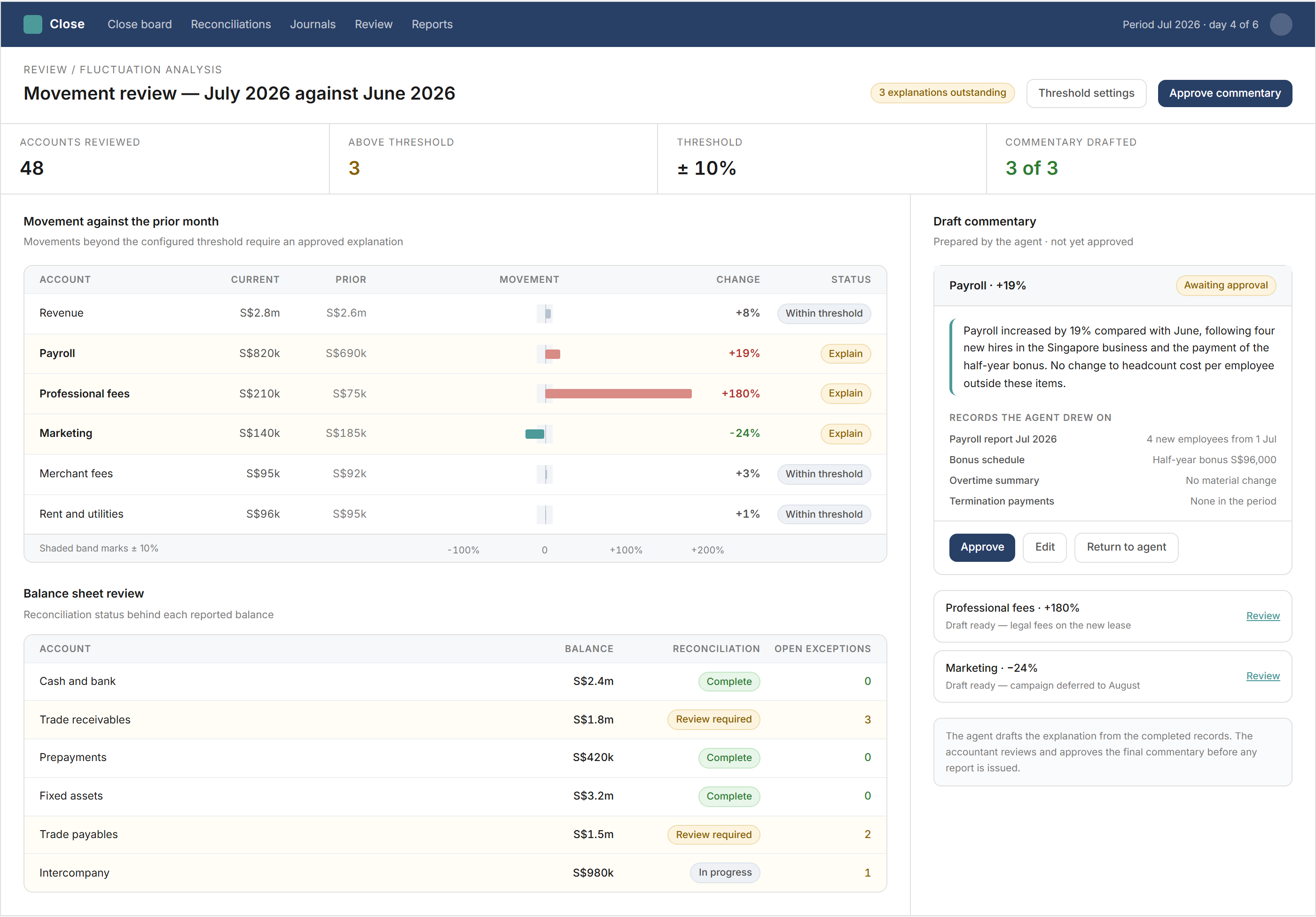
A reconciliation difference becomes a work item with an account, transaction, amount, source, owner and status. The workflow groups related items and keeps the evidence beside the exception so the reviewer can see how it was resolved.
After journals are posted, the workflow refreshes the closing checks. If a late entry changes an account that was already reviewed, it reopens the related reconciliation rather than leaving its earlier completion status unchanged.
The workflow also compares current results with the prior month, prior year, budget or forecast using the finance team’s thresholds. It retrieves supporting records for significant movements and prepares draft commentary, but finance reviews the explanation before reporting.
Where does finance retain control?
The workflow coordinates tasks, retrieves records, prepares routine work and records review history. It does not decide whether an accrual, impairment, provision, reclassification or other adjustment is appropriate.
Accountants investigate exceptions, approve reconciliations and journals, and determine whether unresolved items can remain open. The authorised reviewer decides when the reporting period is ready to close.
The completed record retains the task history, supporting documents, reconciliations, journals, exceptions, comments and approvals. This gives the finance manager one view of how the period moved from source data to reviewed reporting.
The same controlled division between automated preparation and human judgement applies to an AI agent working across business processes.
Backbone helps finance teams connect month-end tasks, evidence, exceptions and approvals in one controlled workflow — while keeping accounting judgement, review and final approval with finance.
Frequently asked questions
This information has been prepared for general informational purposes only and is not intended to be relied upon as accounting, tax, or other professional advice.
Related articles
case-studies
From New Client Enquiry to KYC and Signed Engagement Letter
How professional firms can connect client information, screening, approval and engagement letters in one controlled onboarding workflow.
case-studies
Pat: An AI Agent That Works Across Our Business
How an internal AI agent retrieves information, prepares routine work and coordinates approved actions across business systems while people retain authority.
case-studies
From Merchant Statements to Reconciled Sales and Settlements
How hospitality finance teams connect point-of-sale records, merchant statements, net settlements and bank receipts in one reconciliation workflow.