From Merchant Statements to Reconciled Sales and Settlements
How hospitality finance teams connect point-of-sale records, merchant statements, net settlements and bank receipts in one reconciliation workflow.

Xian Hui
5 August 2026
Quick answer
How can merchant statement reconciliation be automated?
Merchant statement reconciliation can be automated by importing point-of-sale records, statements from each payment provider and bank transactions into one workflow. The system standardises references, recognises merchant discount rates and commissions, groups transactions into settlements, matches receipts and sends only exceptions to finance. It then posts through the ledger or prepares the reconciliation outside it.
From Merchant Statements to Reconciled Sales and Settlements
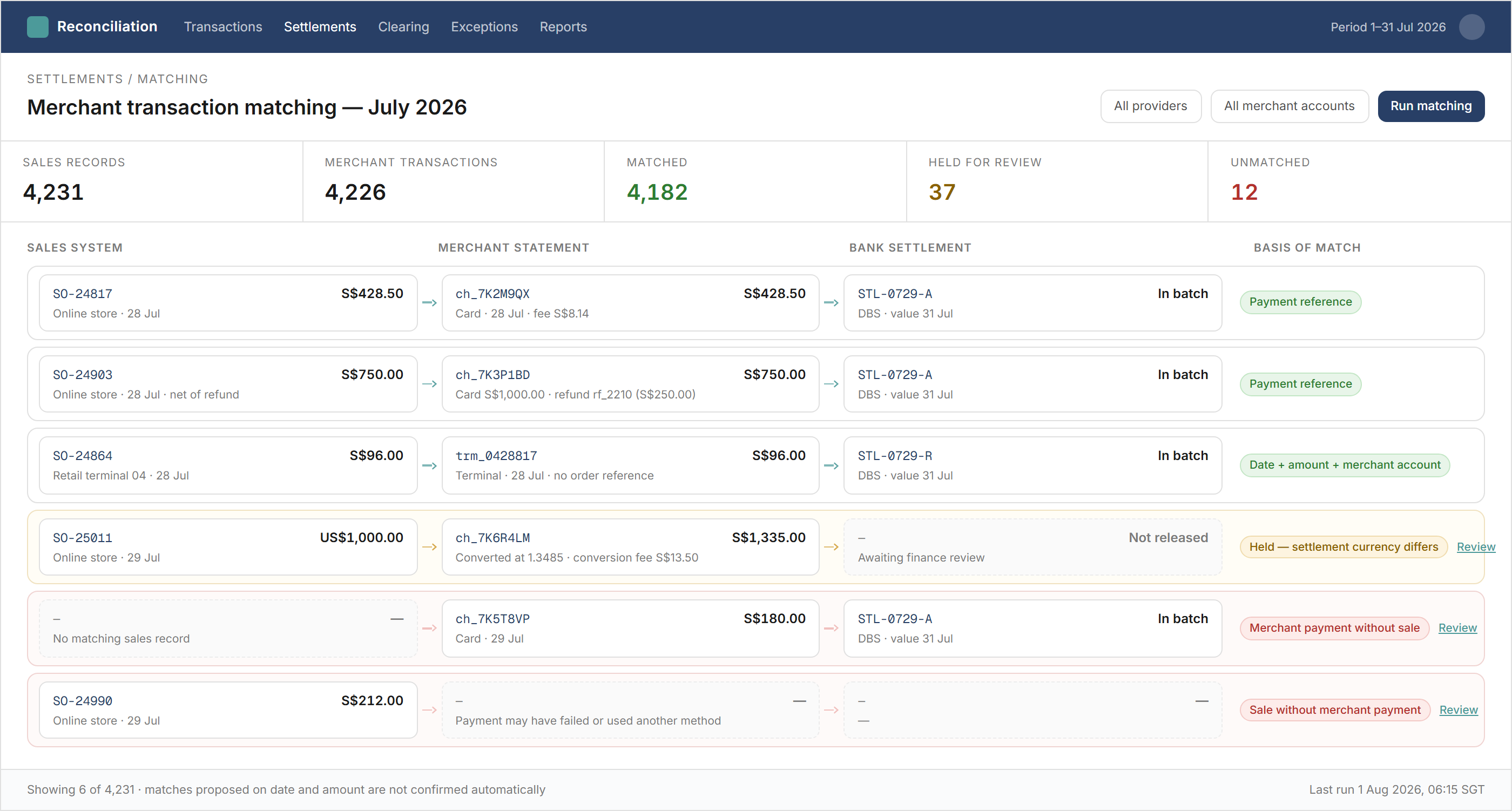
Hospitality businesses collect a high volume of daily payments through several channels. A restaurant, hotel or serviced apartment may record sales in its point-of-sale system, then receive separate merchant statements for credit cards, GrabPay and other payment service providers.
Those providers deduct the merchant discount rate (MDR) or commission, group transactions and deposit the net amount into the bank several days later. Finance must connect the original sales, each provider's statement, the deductions, the settlement batch and the eventual bank receipt.
Why does this reconciliation matter in hospitality?
Daily sales reports support revenue reporting, while merchant statements and bank receipts support the movement of cash. Finance needs the three records to agree before it can close the relevant clearing balances and investigate missing settlements.
The workload is particularly visible in hospitality because outlets may operate every day, accept several payment methods and use separate merchant accounts by location or channel. Refunds, gratuities and transactions submitted after an offline period can add further differences already present in the source records.
The flow is:
- The point-of-sale system records the sale and payment method.
- Each payment provider reports the transactions it processed.
- The provider deducts MDR, commission or other statement adjustments.
- Several transactions are grouped into a settlement and reach the bank later.
Why is a direct POS-to-bank match not feasible?
The point-of-sale system records individual transactions. The bank usually records one net settlement covering a different grouping of transactions, after deductions and a delay.
A weekend's credit-card transactions may arrive in one receipt, while GrabPay follows another settlement cycle and another provider uses separate batches. One receipt may therefore relate to many sales, and one day's sales may lead to several later receipts. Matching only by date and amount creates too many permutations to support a dependable reconciliation.
Provider statements form the necessary middle layer. Stripe, for example, documents reconciliation through transaction-level balance and payout data in its payout reconciliation guidance. Adyen likewise treats settlement reporting as the bridge between processed transactions and paid funds in its settlement reconciliation documentation.
Why do existing ledger tools not solve the whole problem?
A bank feed starts at the final receipt. It does not contain the individual POS transactions or explain how each provider grouped them and calculated its deductions. Matching the receipt inside the ledger confirms that cash arrived, but it does not by itself reconcile the route from gross sales to net settlement.
The required detail also comes from several sources and in different formats. Some providers supply an API, others provide files or portal exports, and each uses its own fields and references. Finance must cleanse and align those records before the ledger's matching features become useful.
The ledger remains part of the process. The question is whether reconciliation should take place inside it or whether a separate workflow should perform the detailed matching first, then push the cleansed entries and adjustments into the ledger.
What records must the workflow connect?
The workflow preserves each source record and maps it into a consistent structure. The fields used depend on what each provider supplies, but the relationship between sources remains the same.
| Record | What the workflow uses | Reconciliation purpose |
|---|---|---|
| POS transaction | Date, outlet, amount, payment method and transaction reference | Establishes the recorded sale |
| Merchant transaction | Provider reference, gross amount and status | Connects the sale to the payment source |
| Settlement statement | Batch, deductions, net amount and settlement date | Explains how transactions were grouped |
| Bank transaction | Value date, reference and amount | Confirms receipt of the settlement |
| Ledger entry | Account, amount, source reference and period | Records and clears the accounting balance |
This structure is useful across restaurants, hotel outlets and serviced apartments. Property businesses may also need to connect the payment flow to reconciled hotel accounts, where reservation, folio and property records add further operational detail.
How does the automated reconciliation work?
The workflow imports POS data, merchant statements and bank transactions from every relevant source. It uses an API where the provider and ledger allow one; otherwise, it uses the best available file, export or posting route. This follows the same practical approach used when moving high-volume transactions into Xero.
It then performs the mechanical work:
- Validate required fields and reject incomplete or duplicated records.
- Standardise dates, currencies, payment methods, provider references and outlet identifiers.
- Match POS transactions to the corresponding merchant records.
- Group merchant transactions into the settlement batches reported by each provider.
- Recognise MDR, commission, refunds and other statement adjustments under configured rules.
- Match the expected net settlement to the bank receipt.
- Post or prepare the resulting ledger entries and flag unresolved differences.
The reconciliation can run outside the ledger where the source volume or matching logic requires it. Where the ledger has suitable features, the workflow can instead push the cleansed transaction detail into it and use its own bank-reconciliation functions.
What does the workflow do with MDR and exceptions?
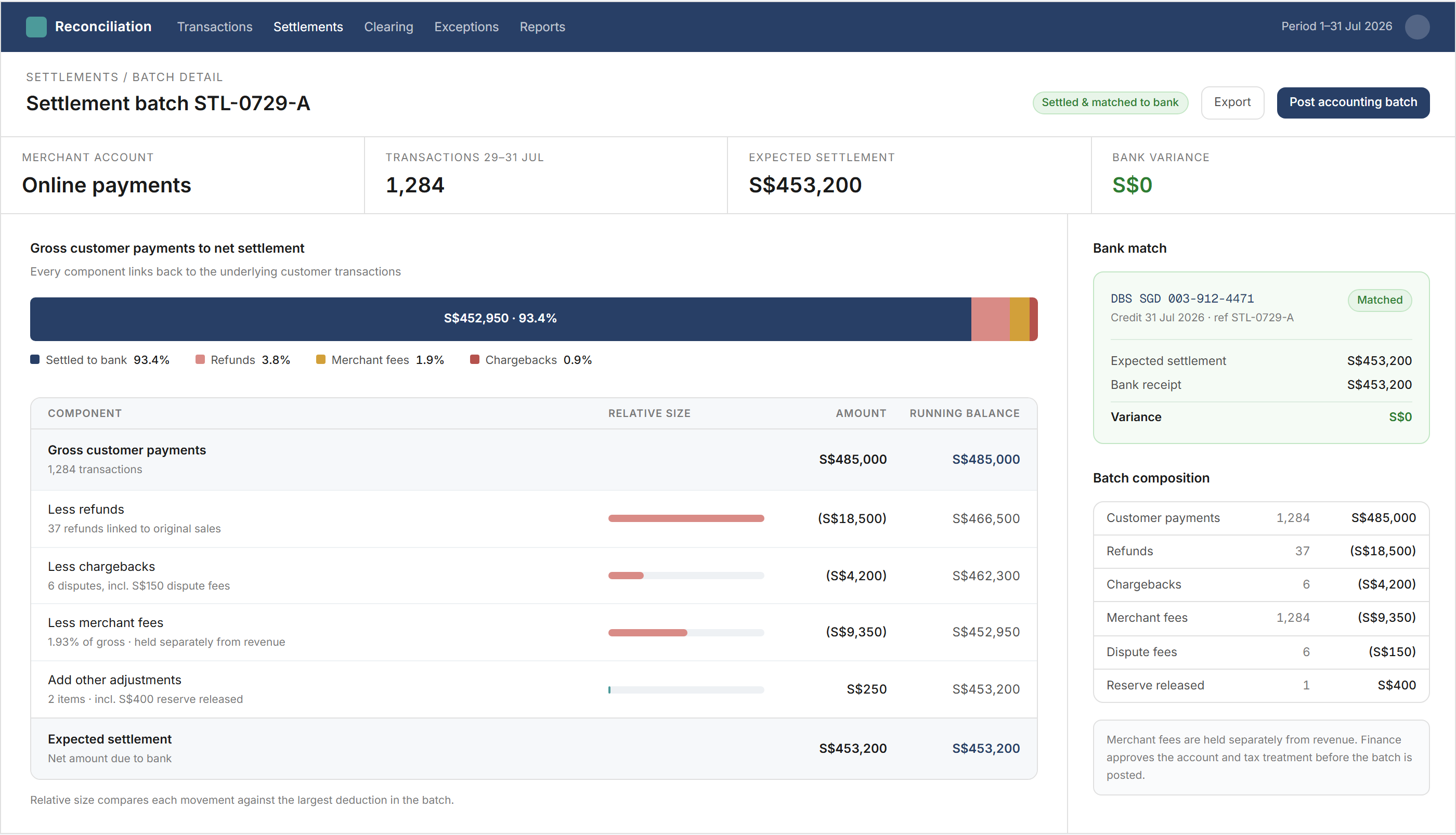
The workflow recognises MDR or commission from the provider's statement rather than treating the net bank receipt as the sales value. It applies the client's configured account mapping and keeps the deduction linked to the provider, settlement and underlying transactions.
For example, the published settlement below shows how a batch moves from gross customer payments to the amount expected in the bank:
| Settlement calculation | Amount |
|---|---|
| Gross customer payments | S$485,000 |
| Refunds | (S$18,500) |
| Chargebacks | (S$4,200) |
| Merchant fees | (S$9,350) |
| Other adjustments | S$250 |
| Expected settlement | S$453,200 |
When a reference is missing, an amount differs or a receipt remains outstanding, the workflow does not force a match. It flags the affected records and shows whether the difference sits between POS and merchant data, within the settlement calculation or between the settlement and bank.
Finance can then review exceptions instead of manually rebuilding every batch. The resulting balances can feed into the wider month-end closing workflow.
What changes for the finance team?
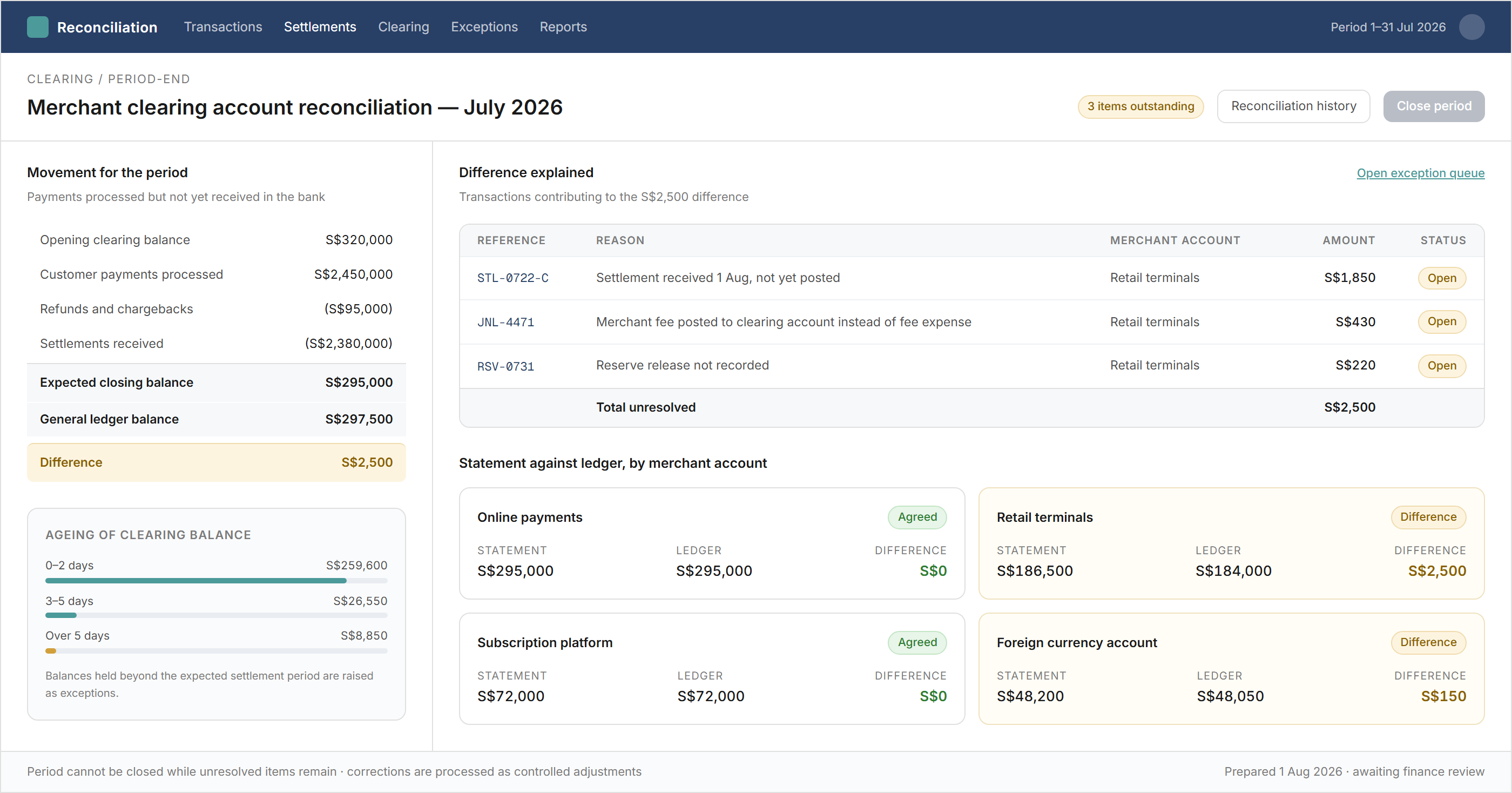
Finance receives a reconciliation built from the complete payment chain rather than a collection of bank matches. Routine transactions can clear automatically when the references, batch calculation and receipt agree.
The team retains control over mappings, exception treatment and period-end approval. It can trace a bank receipt back through the merchant settlement to the original POS transactions without repeating the same cleansing and matching work for every provider.
Backbone helps hospitality finance teams connect POS sales, merchant statements, deductions, settlements, bank receipts and ledger entries in one controlled reconciliation workflow.
Frequently asked questions
This information has been prepared for general informational purposes only and is not intended to be relied upon as accounting, tax, or other professional advice.
Related articles
case-studies
From Month-End Tasks to a Controlled Closing Workflow
How finance teams can connect close dependencies, source data, reconciliations, journals, exceptions and approvals in one controlled month-end workflow.
case-studies
From Millions of Transactions to Xero
How direct API integration moves high-volume operational data into Xero through controlled mapping, batching, exception handling and reconciliation.
case-studies
From Property Management System Data to Reconciled Hotel Accounts
How hotel finance teams connect property management, payment, settlement and ledger data to reconcile revenue, guest balances and receipts.