From Millions of Transactions to Xero
How direct API integration moves high-volume operational data into Xero through controlled mapping, batching, exception handling and reconciliation.

Xian Hui
4 August 2026
Quick answer
How do you import millions of transactions into Xero?
A direct API integration lets source systems send approved accounting data into Xero without repeated downloads, uploads or screen-based automation. The connector retrieves new and amended records, maps them under finance-approved rules, validates and batches the entries, posts them within Xero's API limits and reconciles each result to the source.
From Millions of Transactions to Xero
High-volume operational systems can produce more transaction detail than finance can move into Xero through repeated file imports. The work matters because incomplete, duplicated or incorrectly mapped entries affect the ledger and delay reconciliation.
The transfer must remain reliable as volume grows and source records change. A controlled connection should move the data, preserve its origin and show finance what Xero accepted, rejected or has yet to receive.
Why does high-volume transaction data require a different approach?
Operational data may come from point-of-sale, booking, subscription, marketplace or payment systems. Each system can use different identifiers, dates, account classifications and formats for refunds, fees, tax and settlements.
Finance must turn those records into the entries required for bookkeeping and reporting. The process may need to:
- identify new, amended, cancelled and refunded transactions
- map each record to the correct entity, account and tax treatment
- determine whether to post records individually or in controlled summaries
- prevent a restarted process from creating duplicates
- reconcile the source population to the entries accepted by Xero
This is particularly relevant where revenue, payment and settlement data originate in different systems. The same issue appears when moving property management system data into hotel accounts or processing merchant statements and settlements.
Why do download and upload cycles fall short?
A file import moves data between systems, but it does not remove manual intervention. Someone still downloads the source file, selects the correct period, applies transformations, checks the result and uploads it.
That sequence becomes harder to control when several files, entities or processing runs overlap. Staff can use the wrong version, omit a file, repeat a completed upload or change a formula without carrying the change into the next period.
File imports can still suit occasional or low-volume work. They are less suitable when data must move repeatedly, at scale and with a clear record of what each system sent and received.
Why avoid user-interface automation?
A software robot can imitate a person clicking through Xero screens, but it depends on the interface remaining unchanged. A renamed button, revised page layout or different loading sequence can break the routine.
Screen automation is also difficult to audit at transaction level. It may record that a routine ran, but a direct connection can retain the request, source identifier, response, error and Xero reference for each submitted batch.
Machines should exchange data through the mechanism designed for machines. An application programming interface, or API, is a defined doorway through which one system can request data or send instructions to another without operating its screens.
How does direct API integration work?
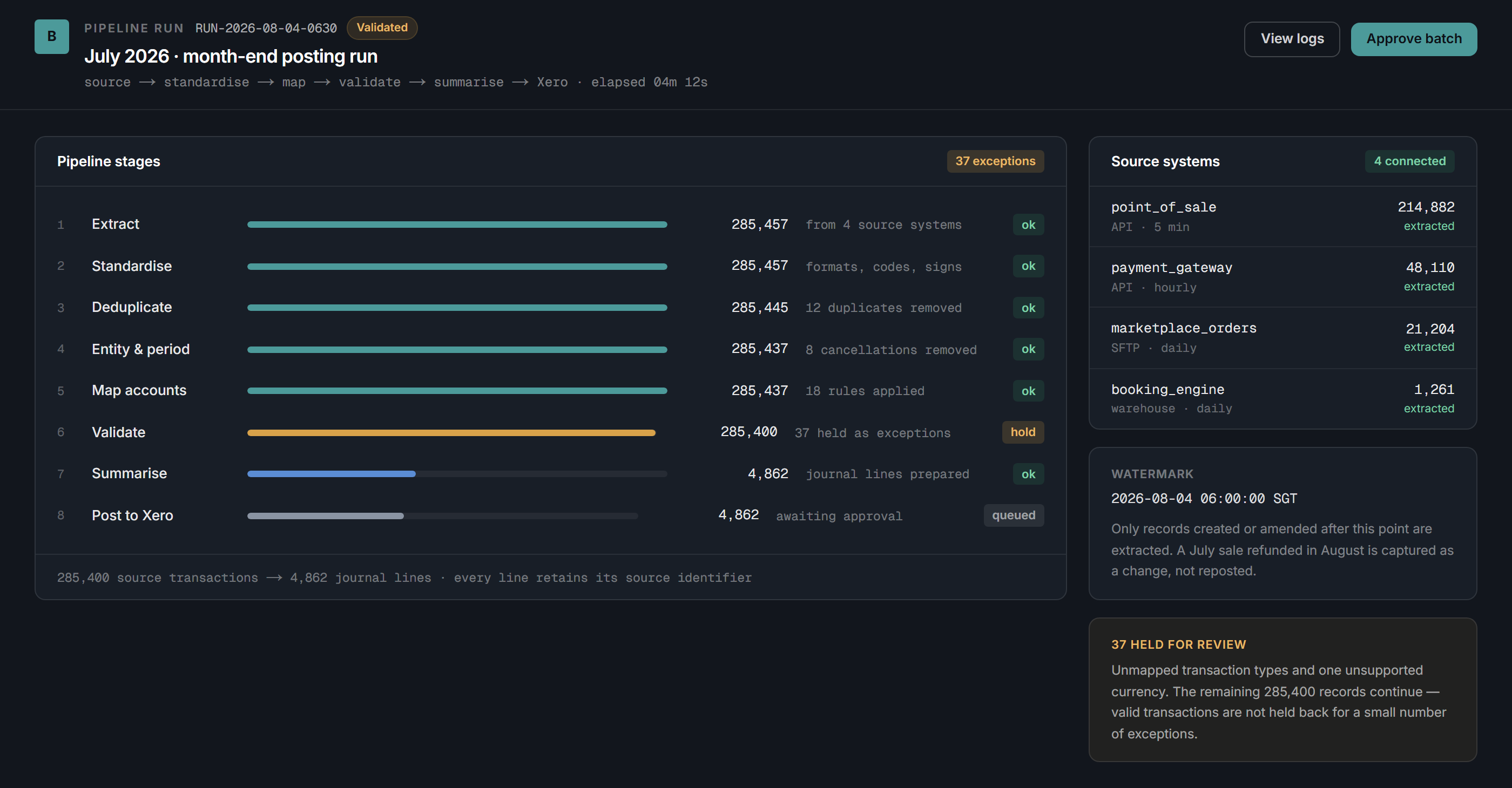
A custom connector sits between the operational source and Xero. It retrieves the required records, converts them into an agreed structure and submits the accounting entries through Xero's API.
| Stage | What the connector does | Control retained |
|---|---|---|
| Extract | Retrieves new and amended source records | Stores the source identifier and extraction time |
| Standardise | Converts dates, currencies and codes into agreed formats | Retains the original source values |
| Map | Applies approved entity, account and tax rules | Holds unmatched records as exceptions |
| Validate | Checks required fields, balances and duplicates | Prevents invalid entries from posting |
| Batch | Groups valid entries for controlled submission | Assigns a unique batch reference |
| Post | Sends approved entries directly to Xero | Records each response and Xero reference |
| Reconcile | Compares source, processed and accepted totals | Reports omissions, rejections and differences |
Finance approves the mapping and posting rules before use. The connector handles the repeated processing, while finance reviews exceptions and decides how unfamiliar or amended transactions should be treated.
How are mapping and transaction detail controlled?
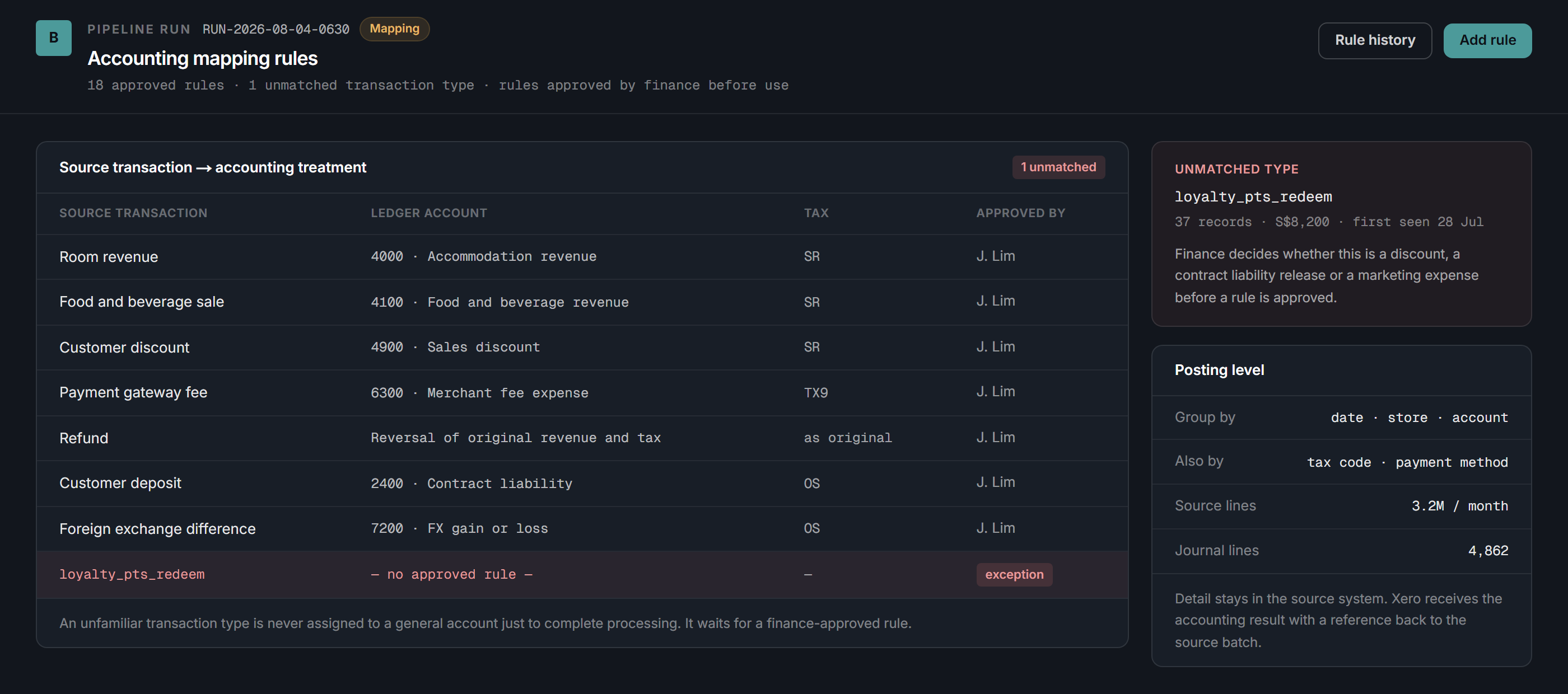
The source system may retain every item, booking, payment attempt or status change. Xero should receive the accounting detail needed for reporting, follow-up and reconciliation rather than automatically receiving every operational event.
Customer or supplier items that require individual follow-up may need separate posting. High-volume point-of-sale data may instead be grouped by date, entity, location, account, tax code or payment method, with the individual records retained in the source system.
The connector applies only approved mappings. It places an unfamiliar transaction type in an exception queue instead of assigning it to a general account merely to complete the run.
How should the connector handle Xero's limits?
Xero applies API limits to each connected organisation, including 5,000 calls in a 24-hour period. A per-minute limit and an app-wide limit also apply, so the connector must regulate when and how it sends requests.
Xero treats an organisation with more than 500,000 invoices as high volume. Its high-volume guidance requires optimised filters and paging, and recommends pages of 100 line items for invoices, contacts, bank transactions and manual journals.
These are integration constraints, not a cap on how many transactions a Xero organisation may hold. A connector should batch submissions, paginate requests and retrieve only records changed since the previous successful run.
How does reconciliation remain complete?
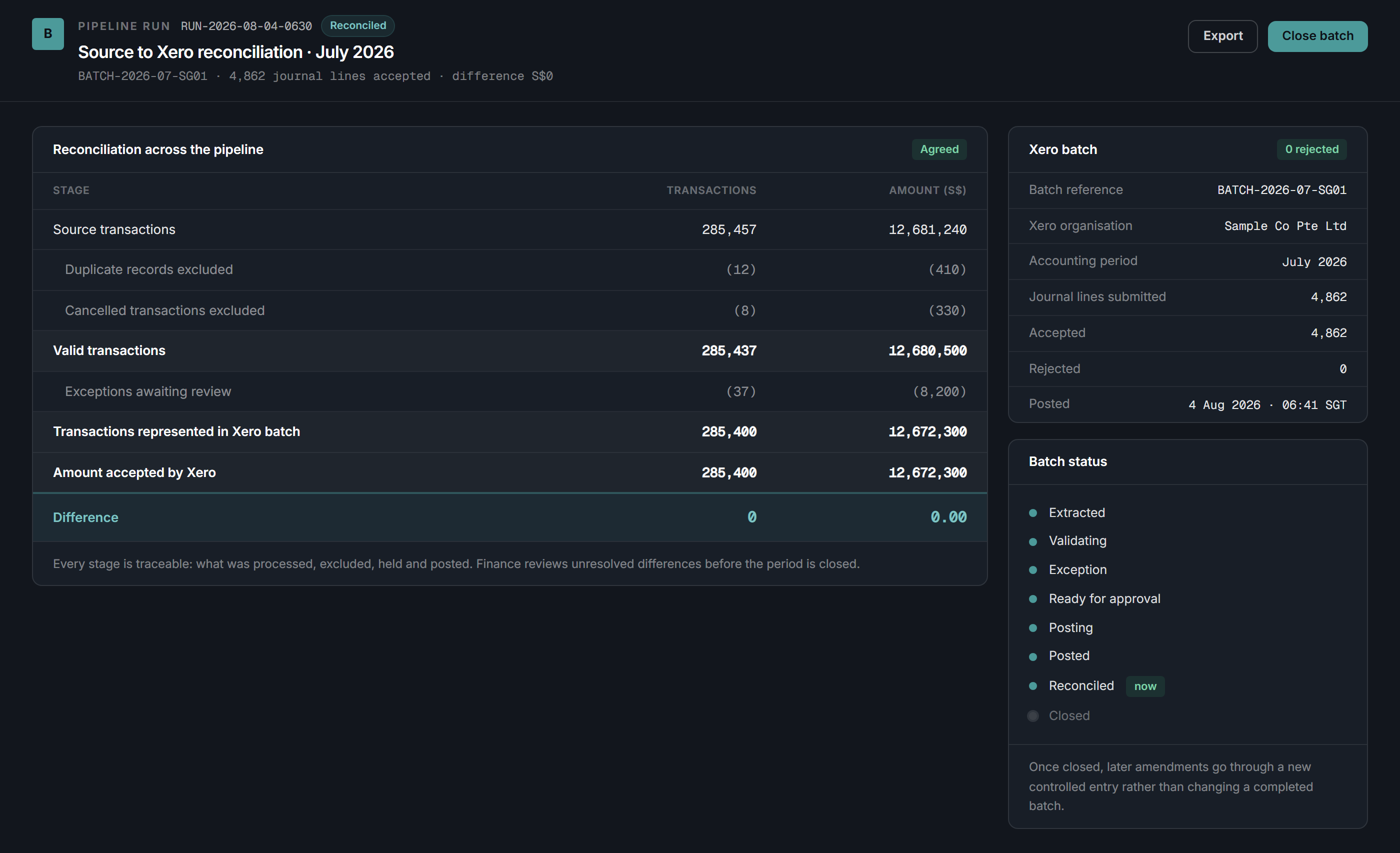
The connector records the progress of each source record through extraction, validation, batching and posting. If Xero accepts part of a batch, the connector retains the successful references and retries only the failed records.
A reconciliation then compares source totals, excluded duplicates or cancellations, exceptions awaiting review and entries accepted by Xero. Finance can see where any difference arose before completing the month-end closing workflow.
Backbone helps finance teams build custom connectors that push high-volume operational data into Xero through direct, controlled and reconcilable API integration.
Frequently asked questions
This information has been prepared for general informational purposes only and is not intended to be relied upon as accounting, tax, or other professional advice.
Related articles
case-studies
Pat: An AI Agent That Works Across Our Business
How an internal AI agent retrieves information, prepares routine work and coordinates approved actions across business systems while people retain authority.
case-studies
From Month-End Tasks to a Controlled Closing Workflow
How finance teams can connect close dependencies, source data, reconciliations, journals, exceptions and approvals in one controlled month-end workflow.
case-studies
From Merchant Statements to Reconciled Sales and Settlements
How hospitality finance teams connect point-of-sale records, merchant statements, net settlements and bank receipts in one reconciliation workflow.