Pat: An AI Agent That Works Across Our Business
How an internal AI agent retrieves information, prepares routine work and coordinates approved actions across business systems while people retain authority.

Xian Hui
11 August 2026
Quick answer
How can an internal AI agent work across business systems?
An internal AI agent gives employees one route into several business systems. It can retrieve records, combine information and prepare or perform permitted actions without requiring the employee to navigate each application. Defined permissions, approval rules and action logs keep financial, contractual and other consequential decisions with the responsible people.
Pat: An AI Agent That Works Across Our Business
Routine work becomes expensive when employees must navigate several systems to answer one question or complete one task. Preparing an invoice may require customer details, agreed pricing, the contract and previous accounting records. Checking a payment may require another sequence across the customer record and accounting system.
Each application can perform its own function, but the employee still joins the process together. The work is slow because people repeatedly locate records, reconcile identifiers, transfer information and remember which approval applies.
An internal AI agent provides one controlled route across those systems. It retrieves information, prepares the permitted next step and sends exceptions to the responsible person.
Why does work slow down between business systems?
Business information is usually divided by function. Customer relationship management holds contacts and commercial history, the accounting system holds invoices and payments, and document storage holds contracts and correspondence.
A simple request can therefore involve several searches. The employee must establish that records in different systems refer to the same customer, decide which source governs each field and assemble the result before acting.
The repeated workload commonly includes:
- locating the relevant customer and contract
- retrieving pricing, invoices and payment records
- comparing information held in different systems
- preparing the transaction or follow-up for review
This fragmentation also affects connected accounting processes. A month-end closing workflow may depend on records prepared elsewhere, while client onboarding and KYC produces information that later supports billing and service delivery.
Why do existing applications not solve the whole problem?
Search within one application only covers the information held there. Integrations can move defined fields between systems, but they usually require a known trigger and a fixed sequence.
Traditional workflow automation remains appropriate for predictable work. A rule can send an invoice reminder after a defined period or create a task when a status changes. It is less suitable when a colleague asks why a customer’s claimed payment does not appear against the expected invoice.
A general chatbot has the opposite limitation. It can interpret the question, but without controlled connections it cannot retrieve the underlying customer, contract and accounting records or carry out an approved action.
The internal agent combines interpretation with defined system tools. It complements fixed automation rather than replacing the applications, databases and controls that already govern the work.
How does Pat process a request?
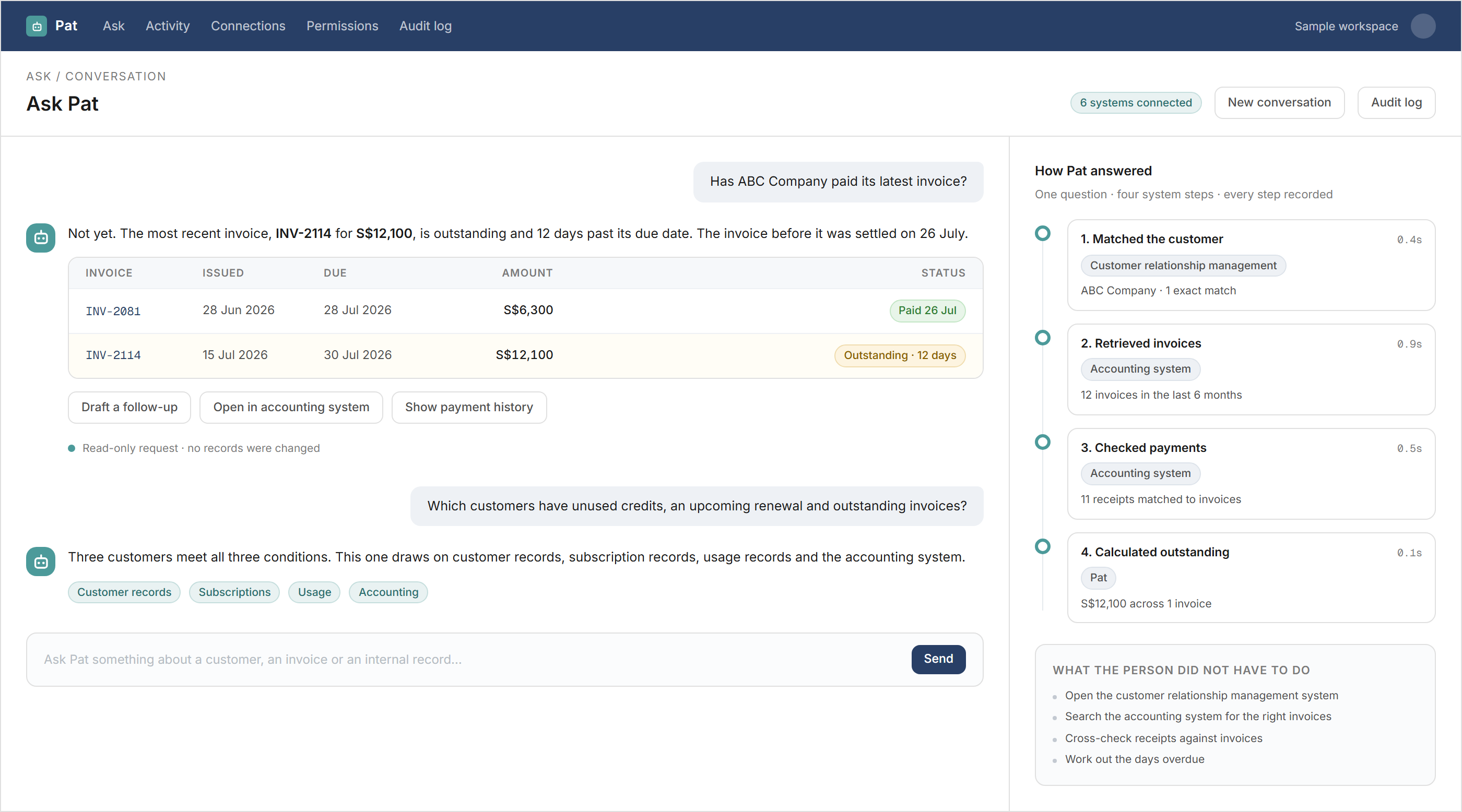
A team member asks Pat a question in ordinary language, such as whether a customer has paid its latest invoice. The agent identifies the customer, retrieves the relevant invoices, checks payment records and presents the result with the sources used.
For invoice preparation, the sequence is mechanical:
- identify the customer and approved billing arrangement
- retrieve the billing period, pricing and previous invoices
- calculate and prepare the proposed invoice
- run the defined checks and request approval where required
- create the invoice only after the workflow permits the action
The same pattern can prepare an overdue account summary, draft a customer follow-up or create an internal task. Where high-volume transactions must enter an accounting platform, a separate accounting data pipeline remains the appropriate mechanism.
How are knowledge, actions and permissions separated?
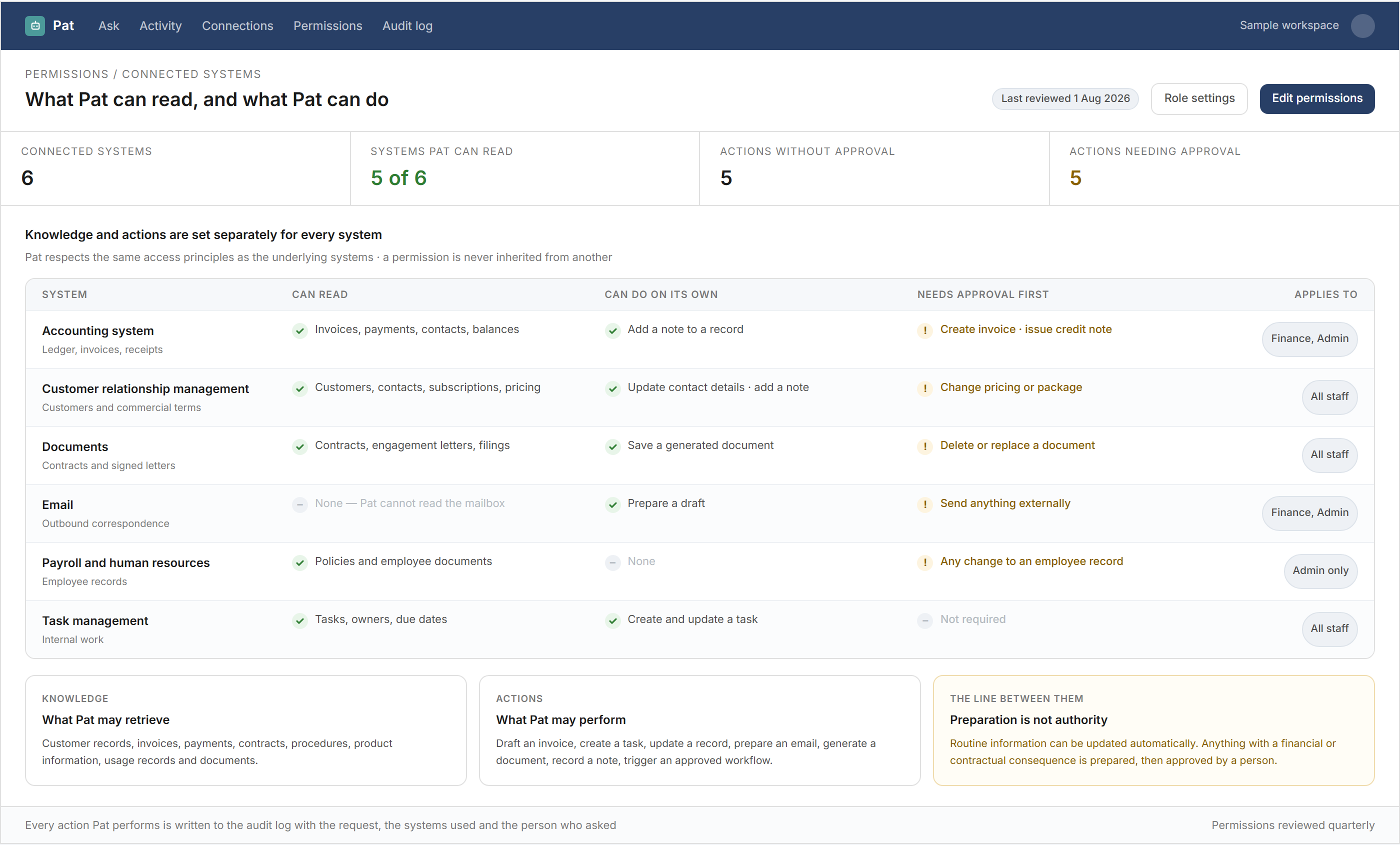
The agent needs separate authority to read information and to change it. Access to an invoice does not by itself grant authority to create, amend or send one.
| Work | Information the agent retrieves | Permitted preparation or action | Human responsibility |
|---|---|---|---|
| Account enquiry | Invoices, payments and customer records | Assemble the account position | Decide any customer response |
| Invoice preparation | Contract, pricing and billing history | Prepare or create an approved invoice | Resolve unusual billing terms |
| Customer follow-up | Outstanding items and contact details | Draft a message | Approve what is communicated |
| Internal administration | Policies, records and documents | Prepare a standard document or task | Review exceptions |
| System update | Existing record and authorised fields | Apply a permitted update | Approve restricted changes |
Permissions should follow the user’s role and the controls of the underlying systems. The agent should record the request, records consulted, checks performed, action taken and approval received.
The National Institute of Standards and Technology AI Risk Management Framework places governance, measurement and management around AI use. The UK National Cyber Security Centre’s guidelines for secure AI system development also address secure operation, access controls, logging and monitoring.
When should the agent stop and ask for a decision?
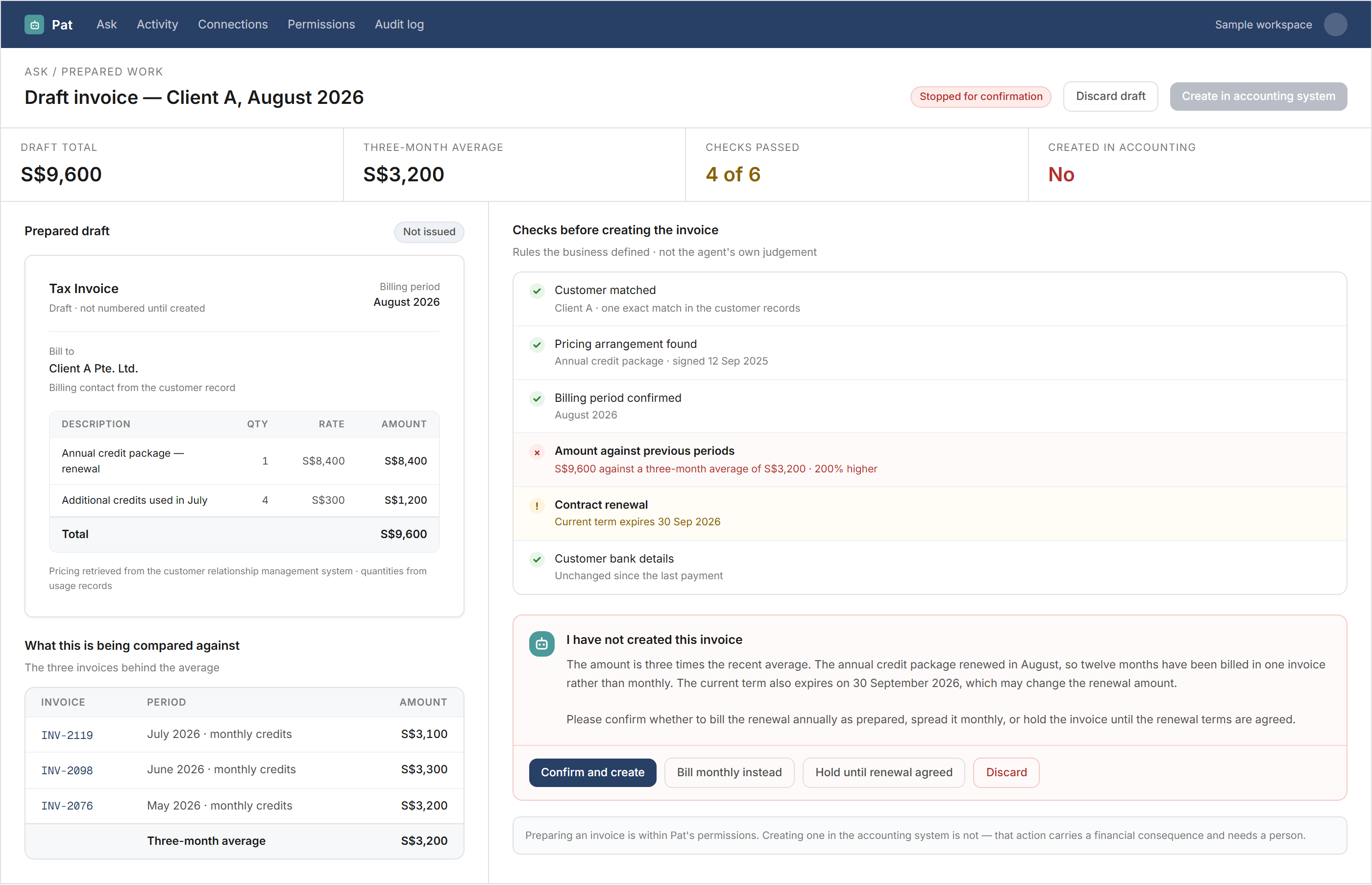
Defined checks determine when the workflow can continue. The agent should stop where a contract has expired, pricing conflicts across systems, information is missing or an action requires authority it does not hold.
It should present the relevant evidence rather than conceal the uncertainty. For an invoice, that may include the retrieved contract terms, previous billing, proposed amount and failed check.
This handover keeps judgement with the responsible employee. It also creates a record of why the agent stopped, who resolved the issue and what action followed.
What does one internal agent change?
The agent reduces repeated navigation and data transfer without removing the systems that hold authoritative records. Employees ask for the work they need, while the agent handles the permitted retrieval and preparation across applications.
The practical benefit comes from shortening the path between a request and a controlled result. Clear permissions, fixed checks, approval points and action logs remain necessary because the agent coordinates work; it does not assume accountability for it.
Backbone helps accounting and finance teams build internal agents around their existing systems and controls — while keeping financial, contractual and operational decisions with the responsible people.
Frequently asked questions
This information has been prepared for general informational purposes only and is not intended to be relied upon as accounting, tax, or other professional advice.
Related articles
case-studies
From Headcount Plan to Payroll Forecast
How finance and people teams can maintain an employee-level payroll forecast as hiring, compensation and employer-cost assumptions change.
case-studies
From Historical Cash Movements to a Rolling Cash Flow Forecast
How finance teams connect bank balances, receivables, payables and planned commitments to maintain a rolling cash flow forecast.
case-studies
From New Client Enquiry to KYC and Signed Engagement Letter
How professional firms can connect client information, screening, approval and engagement letters in one controlled onboarding workflow.