From Approved Payments to a Bank-Ready Payment File
How finance teams validate approved payment requests, resolve exceptions and generate bank-ready payment files without weakening authorisation controls.

Xian Hui
3 August 2026
Quick answer
How can payment file generation be automated?
A controlled workflow imports approved payment requests, checks approval status, payee details, duplicates, credits and holds, then groups valid items into a payment batch. It generates the bank payment file and a matching control report for review. Authorised users retain responsibility for approving the batch and releasing funds.
From Approved Payments to a Bank-Ready Payment File
A payment run moves money, so speed matters only when the underlying instructions remain complete, accurate and authorised. Before finance produces a bank payment file, it must confirm which approved items are due, which account will fund them and whether anything has changed since approval.
That work becomes slow when invoices, employee claims, supplier records and approvals sit in different systems. Finance has to assemble the batch, repeat checks and prove that the file sent to the bank agrees with the approved payment listing.
A controlled workflow performs the structured preparation and directs exceptions to finance. Authorised users continue to approve the batch and release the funds.
Why does payment file preparation take time?
An approved invoice is not automatically ready for payment. Finance may still need to apply a credit note, respect a payment hold, select the paying entity or confirm that the supplier's bank details match the approved master record.
The source records are often fragmented. An accounting system may hold the invoice, an email may contain the approval and a separate supplier file may hold the payment instructions. The same problem appears in petty cash reimbursement, where approval, evidence and settlement must remain connected.
Before each payment run, finance commonly has to:
- collect approved invoices, employee claims and other payment requests
- resolve missing approvals, duplicate warnings and changed bank details
- apply credits, partial payments and holds
- reconcile the approved batch to the bank payment file
Each manual hand-off creates another opportunity to omit an item, use an outdated record or alter a batch without repeating the approval.
Why does the accounting system not solve the whole problem?
The accounting system records invoices and supplier balances, but the payment run also depends on information outside the ledger. Approval evidence may come from procurement or expense systems, while bank mandates and supplier-detail verification may follow separate controls.
Bank file generation also depends on the selected bank, account, currency and payment method. The workflow must translate approved payment data into the required message structure. Singapore’s payment systems use the ISO 20022 message standard, while the applicable implementation still depends on the receiving bank or payment service.
A spreadsheet can bridge these sources, but it does not enforce the sequence. Staff can overwrite formulas, change bank details or regenerate a file after approval without a reliable connection to the version originally reviewed.
What must be checked before a payment enters the batch?
The workflow first imports payment requests that have reached the required approval status. It retains the source reference, payee, amount, currency, due date, paying entity, bank account and supporting document link.
It then applies configured checks consistently:
| Check | System action | Finance action |
|---|---|---|
| Approval status | Excludes items with missing approvals | Resolves or obtains the required approval |
| Supplier bank details | Compares instructions with the approved record | Verifies new or amended details |
| Duplicate payment check | Matches invoice and payment identifiers | Decides whether the item is valid |
| Credits and holds | Proposes the net amount or exclusion | Confirms the treatment |
| Paying account | Groups by entity, currency and payment method | Confirms the account and payment date |
A possible duplicate or bank-detail difference does not disappear into a warning log. The workflow holds the item outside the batch, records the reason and assigns it for review.
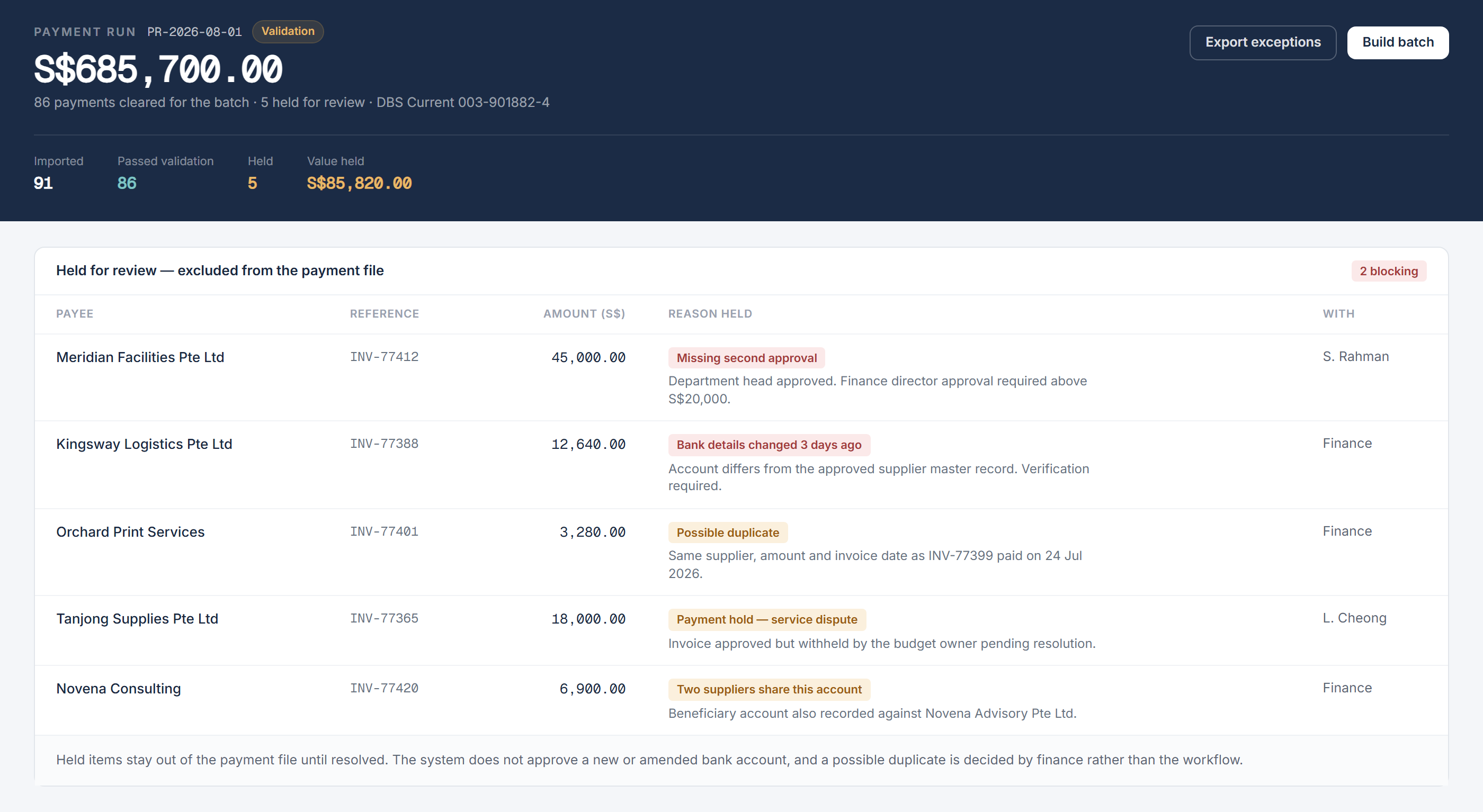
The system does not approve a new bank account or decide that an unusual payment is legitimate. Finance resolves the exception under the organisation's existing supplier and payment controls.
How is a controlled payment batch assembled?
Once items pass validation, the workflow groups them by paying entity, bank account, currency, payment date and payment method. It shows the invoices, credits, holds and proposed net amount behind each batch.
The payment preparer reviews the proposed composition and can remove an item without cancelling the underlying invoice. The workflow records the reason, so an approved but temporarily withheld invoice remains visible for a later run.
This batch also provides an input to the organisation's rolling cash-flow forecast. The forecast can use scheduled, approved payments without treating unresolved or held items as settled commitments.
How does the workflow generate and control the bank file?
After the preparer confirms the batch, the workflow generates the bank payment file in the required structure. It also produces a readable control report containing the same batch reference, transaction count and total.
The file follows the selected payment channel's technical requirements. Structured payment messages require defined fields and formats rather than an informal spreadsheet layout, which is why the bank rejects a file that does not match its specification. The Monetary Authority of Singapore sets out the range of available electronic payment methods.
The workflow compares the file total with the approved batch and stops processing if they differ. It then locks the confirmed version so later changes cannot retain an earlier approval.
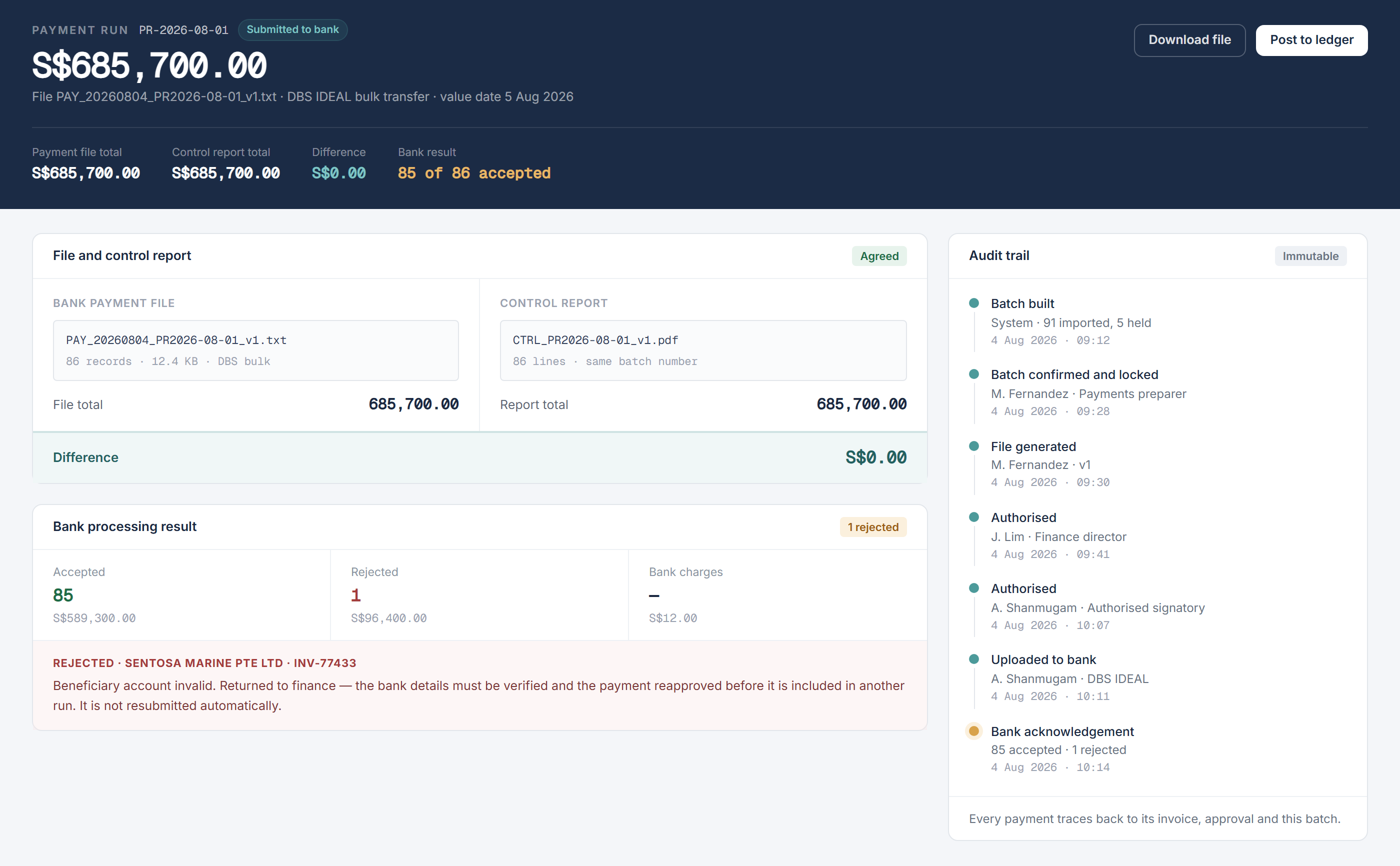
The audit trail records who prepared the batch, who approved it, which file version was generated and who transmitted it. These records keep payment run automation traceable without allowing the workflow to release money independently.
Where do authorised users remain in control?
The organisation's banking mandate and payment limits determine who must approve each batch. The workflow routes the batch to those users and presents the payment listing, exceptions cleared, paying account, payment date and control report.
Preparation, approval and release remain separate. A preparer cannot independently approve and release the same batch, and any amendment after approval requires the revised version to pass through approval again.
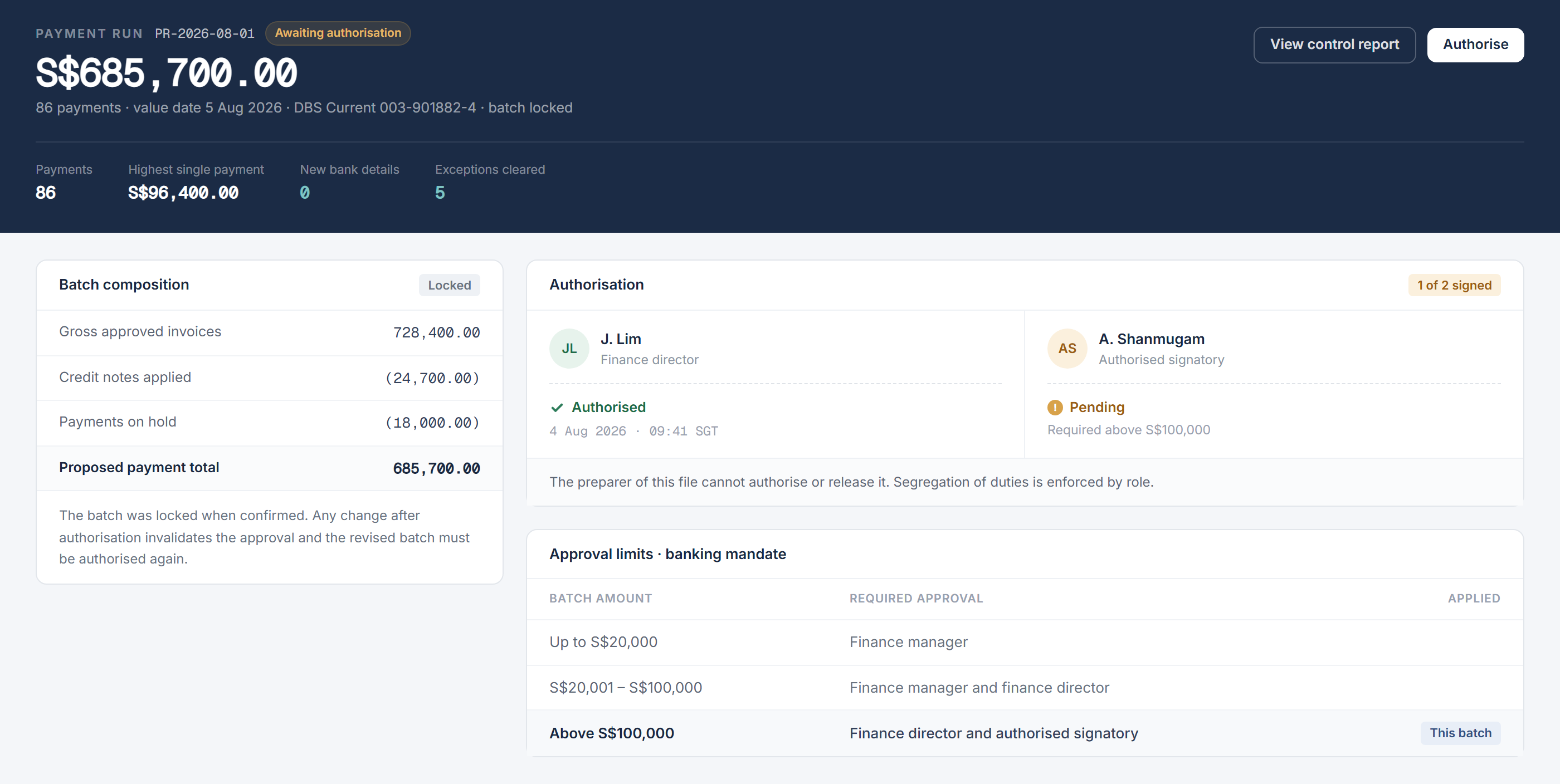
The authorised user uploads or transmits the approved file through the bank's permitted channel. The bank's own authentication and release process still applies.
What happens after the bank processes the batch?
The workflow compares the bank acknowledgement with the approved batch and the accounting records. It marks accepted payments for posting or clearing and sends rejected or returned items to finance with the bank's response.
A rejected payment does not cause the successful payments to be repeated. Finance verifies the exception, corrects the underlying record and obtains any required reapproval before including it in another run.
The same principle applies when reconciling high-volume receipts: accepted and exceptional items must remain distinct. A connected sales and settlement reconciliation workflow uses this separation to keep valid processing moving while preserving follow-up.
Backbone helps finance teams connect payment selection, validation, file generation, approval and reconciliation in one controlled workflow — while keeping payment approval and access to funds with authorised employees.
Frequently asked questions
This information has been prepared for general informational purposes only and is not intended to be relied upon as accounting, tax, or other professional advice.
Related articles
case-studies
From Member Records to Billing, Collection and Renewal
How one controlled workflow connects member records, fee calculations, invoicing, payment matching and renewals while routing exceptions for review.
case-studies
From Headcount Plan to Payroll Forecast
How finance and people teams can maintain an employee-level payroll forecast as hiring, compensation and employer-cost assumptions change.
case-studies
From Historical Cash Movements to a Rolling Cash Flow Forecast
How finance teams connect bank balances, receivables, payables and planned commitments to maintain a rolling cash flow forecast.