From Member Records to Billing, Collection and Renewal
How one controlled workflow connects member records, fee calculations, invoicing, payment matching and renewals while routing exceptions for review.

Xian Hui
3 August 2026
Quick answer
How can membership billing and management be automated?
A connected membership workflow holds the member record, applies approved fee rules, generates invoices, matches payments and prepares renewals. It keeps membership and accounting records aligned while routing waivers, partial payments, disputed charges and status changes to the responsible person for review.
From Member Records to Billing, Collection and Renewal
Membership income depends on more than sending invoices. The organisation must bill the right member under the right fee arrangement, collect and match the payment, then update the membership record before the next renewal.
This work becomes slow when membership and finance maintain separate records. Each change in category, status, fee or payment arrangement creates another point that the teams must reconcile.
Why does membership billing matter beyond invoicing?
The member record determines who should be billed, for which period and under which terms. The invoice and payment record then affect renewal, arrears follow-up and the member's current status.
A missed hand-off can leave an active member without an invoice or a paid member marked as overdue. It can also delay answers to routine questions about payment, expiry or renewal.
The process therefore needs one traceable route from application to collection. This follows the same principle as a controlled finance operations workflow: standard transactions move consistently, while exceptions remain visible.
What makes the workload difficult to control?
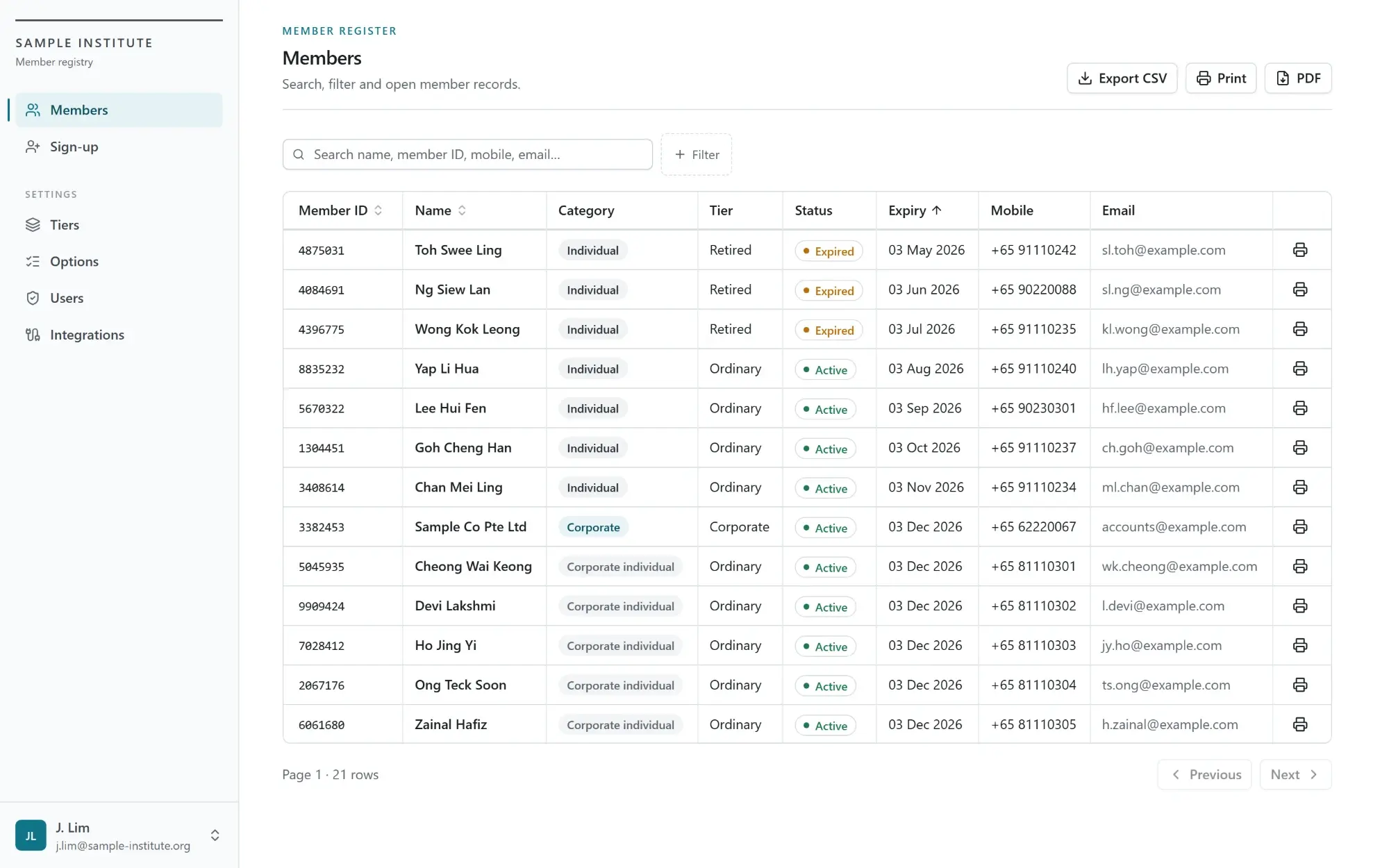
Different membership categories may carry different fees, billing cycles, joining charges and renewal dates. Corporate memberships may group several individuals under one payer, while waivers, instalments and category changes alter individual records.
The work repeats throughout the membership cycle:
- maintain the member and billing details
- apply the approved fee rule
- generate and deliver the invoice
- match receipts and resolve differences
- prepare renewals and update status
The volume of routine cases can conceal the exceptions that need attention. A missing payment reference, backdated change or disputed fee cannot safely follow the standard route.
Why do separate membership and accounting tools fall short?
Membership management software can hold applications, categories and renewal dates. Accounting software can issue invoices and record receipts. Neither record is complete when the connection between them relies on exports, manual updates or periodic spreadsheet comparisons.
The membership team may change a category without updating the invoice. Finance may receive a payment without knowing which individual sits under a corporate account. A renewal reminder may then use an old fee, status or balance.
Payment and accounting platforms provide useful interfaces for integration. For example, Stripe documents an invoice lifecycle from draft through payment, while Xero publishes API limits and integration guidance. Those tools manage their own records; the organisation still needs a workflow that connects them to its membership rules and approvals.
How does the connected workflow operate?
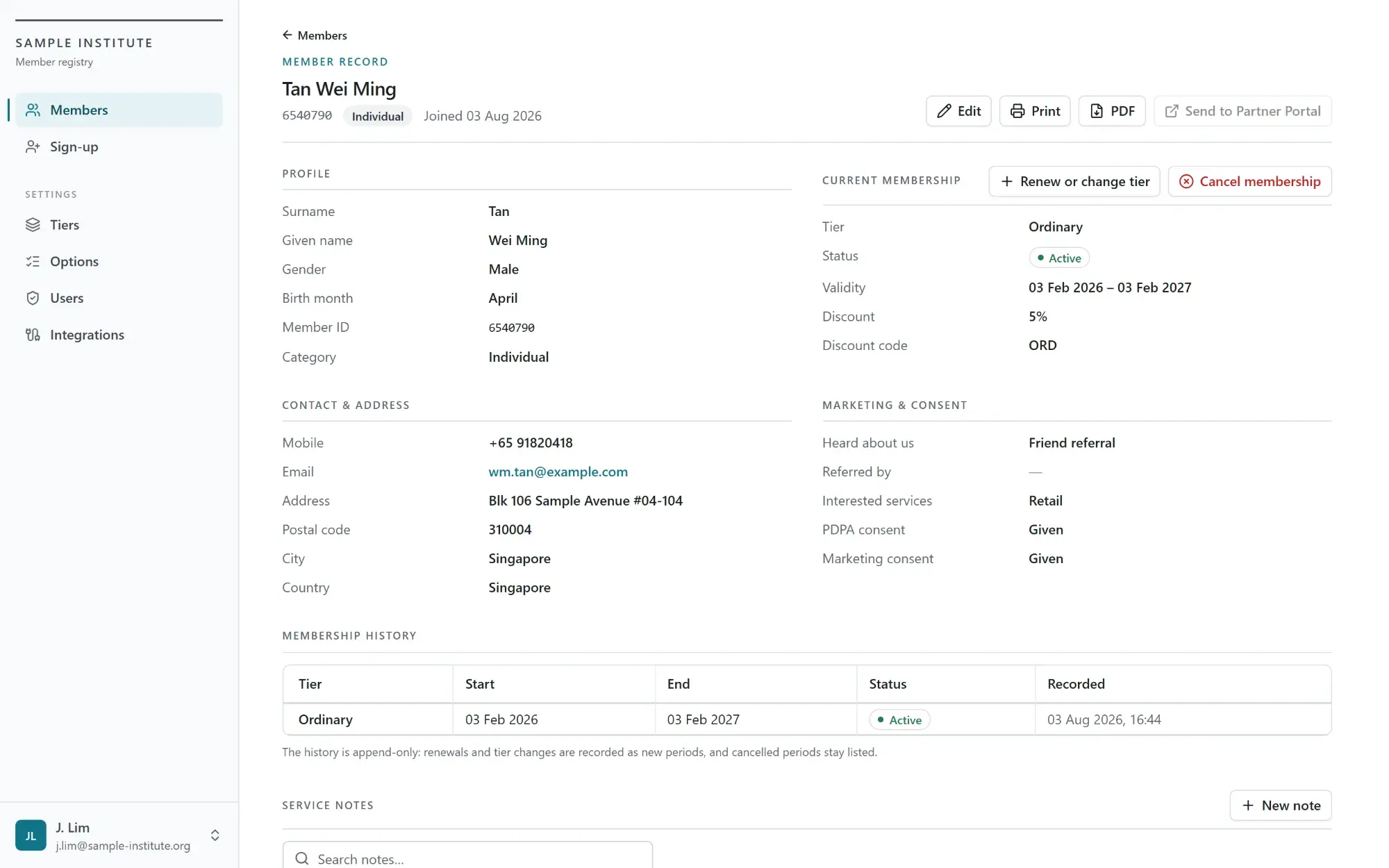
The workflow begins with a structured member record. It stores the membership number, category, joining and renewal dates, billing frequency, payer relationship, fee arrangement, payment method and current status.
Once the organisation approves the application or change, the workflow selects the applicable fee rule and prepares the invoice. It records the calculation against the member and posts the approved invoice to the accounting system.
Incoming payment data then enters the matching process. The workflow checks the invoice number, membership number, reference, payer, amount and date. Clear matches update the invoice; ambiguous, partial or excess payments enter an exception queue.
Before expiry, the workflow checks the current category, next period, fee schedule, balance and recorded arrangement. It prepares the renewal notice or invoice, sends reminders under the approved timetable and updates the membership only when the required conditions have been met.
Where do people retain control?
Rules should handle standard cases, but they should not decide every membership outcome. The system prepares the record and evidence; the responsible team approves decisions affecting fees, eligibility or status.
| Workflow stage | System action | Team decision |
|---|---|---|
| Application | Captures details and checks required fields | Approves or rejects the application |
| Fee calculation | Applies the recorded fee rule | Approves waivers and special arrangements |
| Invoicing | Prepares and posts the invoice | Resolves disputed or unusual charges |
| Payment matching | Matches clear receipts | Reviews partial or ambiguous payments |
| Renewal | Prepares notices, invoices and reminders | Reviews eligibility and exceptions |
| Membership status | Applies approved status rules | Approves suspension, termination or reinstatement |
This separation prevents an overdue invoice from changing a member's rights without the required approval. It also gives each exception an owner, supporting documents and a recorded decision.
An AI agent working across business processes may retrieve records or prepare a response to a member. It should not approve a waiver, alter a category or terminate a membership without authorisation.
How are the records reconciled?
The workflow compares the operational record with invoices, receipts and renewals. It flags active members without invoices, ledger invoices without matching members, unposted receipts, unsupported credit notes and renewals recorded without the required payment.
Payment matching follows the same controlled logic used for merchant settlement reconciliation. The system records the basis for each match and leaves unresolved items visible rather than forcing them into the nearest invoice.
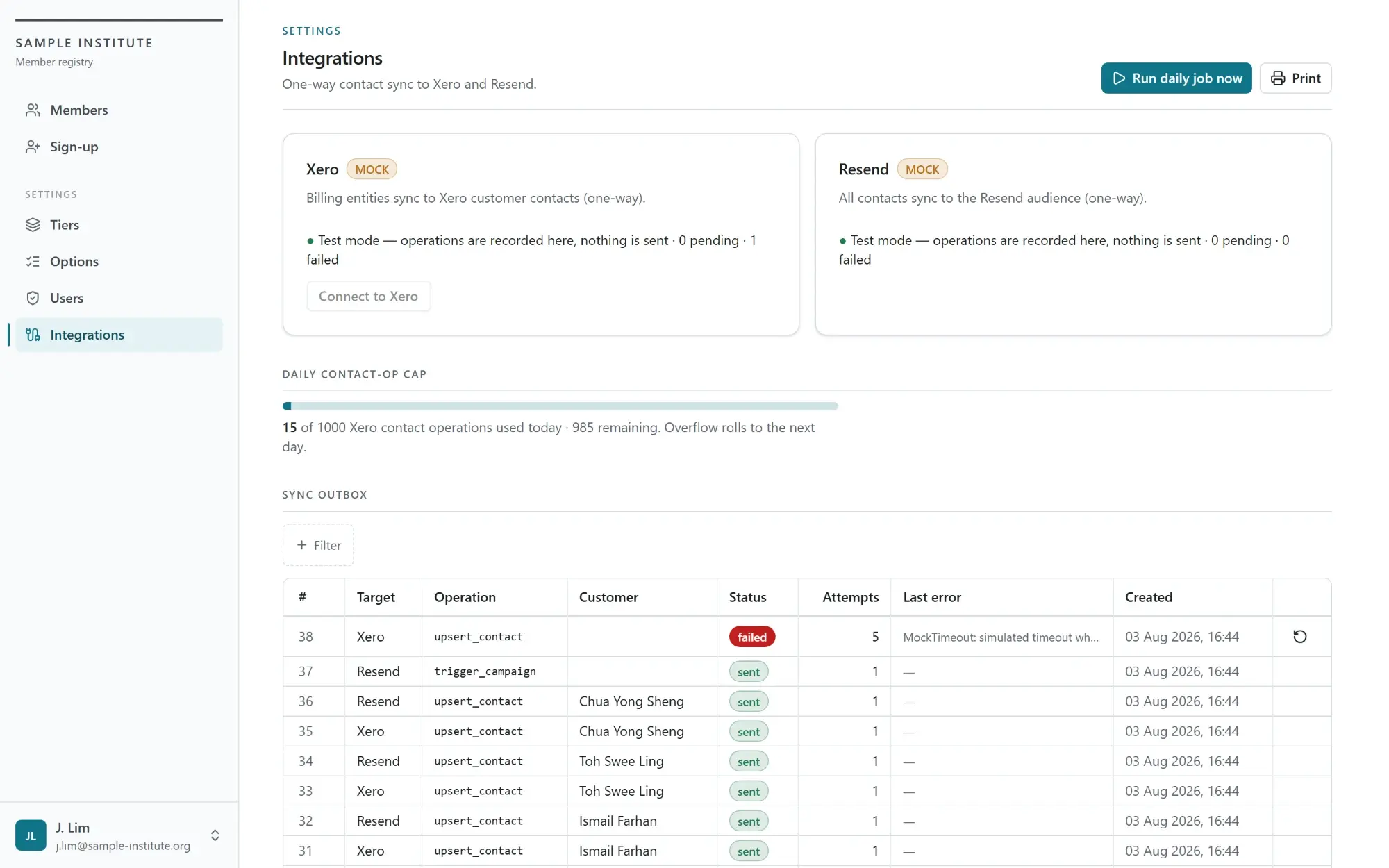
The integration also needs an outbox for transfers to the accounting, payment and email platforms. Each operation carries a status, and failed transfers remain available for investigation and retry.
What does the connected process change?
The membership and finance teams work from the same member, invoice, payment and renewal history. They no longer need to rebuild that connection whenever a member asks about a charge or the organisation starts a renewal cycle.
The system completes the repetitive preparation and highlights departures from the approved rules. The teams retain responsibility for exceptions, member communication and decisions that affect fees or status.
Backbone helps membership and finance teams connect member records, billing, collection and renewal in one controlled workflow — while keeping fee exceptions, membership decisions and member relationships with the organisation.
Frequently asked questions
This information has been prepared for general informational purposes only and is not intended to be relied upon as accounting, tax, or other professional advice.
Related articles
case-studies
From Approved Payments to a Bank-Ready Payment File
How finance teams validate approved payment requests, resolve exceptions and generate bank-ready payment files without weakening authorisation controls.
case-studies
From Headcount Plan to Payroll Forecast
How finance and people teams can maintain an employee-level payroll forecast as hiring, compensation and employer-cost assumptions change.
case-studies
From Historical Cash Movements to a Rolling Cash Flow Forecast
How finance teams connect bank balances, receivables, payables and planned commitments to maintain a rolling cash flow forecast.