From Fixed Asset Register to Physical Stock Take
How finance teams connect depreciation, tax support, asset tagging and physical verification while retaining control over accounting and asset exceptions.

Xian Hui
3 August 2026
Quick answer
How can fixed asset management and stock take be automated?
A connected fixed asset workflow runs depreciation under the organisation's own policies, creates tags for physical labelling and keeps each asset's location and condition with its accounting record. During a stock take, employees use a mobile phone to scan tags and record findings. Finance then receives a status report and resolves exceptions.
From Fixed Asset Register to Physical Stock Take
A proper PPE register supports depreciation calculations, tax submissions and the inventory list used for physical verification. It must connect the accounting record to the asset that employees can locate and inspect.
That connection becomes harder to maintain as asset numbers grow. A description and cost may support the ledger, but they do not tell a stock take team where to find an item or whether specialised machinery remains in its recorded condition.
A connected workflow keeps those records together. It runs depreciation under the client's policies, creates tags for labelling, supports mobile scanning and reports the status of the physical verification.
Why does the fixed asset register matter?
Finance uses the register to calculate depreciation and retain the records supporting each asset balance. IAS 16 Property, Plant and Equipment addresses recognition, carrying amounts, depreciation charges and impairment losses, so the register must preserve the approved inputs and subsequent changes.
The register also supports tax work. The Inland Revenue Authority of Singapore guidance on capital allowances requires companies to identify qualifying plant and machinery and indicate the assets and methods used in their capital allowance schedules.
The same register provides the population for physical verification. Finance, tax and stock take work should therefore draw from one controlled asset record rather than separate schedules assembled for each purpose.
What information makes physical verification workable?
Each record needs a unique asset number, a clear description and the accounting inputs required under the client's policy. It should remain linked to the supplier invoice, approval and relevant accounting transaction.
Where asset items are numerous, the system must also hold their exact locations. A general entry such as “head office” gives the stock take team too much ground to search; a building, floor, room or operational area makes the record usable.
Specialised machinery requires condition monitoring as well as location tracking. The record should show whether the machinery was found in its expected place and whether its observed condition requires follow-up.
| Register field | Work it supports |
|---|---|
| Cost and available-for-use date | Depreciation calculation |
| Asset category and tax details | Tax submission support |
| Exact location | Physical verification |
| Condition | Monitoring of specialised machinery |
| Tag number and serial number | Identification during the count |
These fields also support connected processes. An asset acquired through an employee reimbursement should enter the same review and registration process as one bought through accounts payable.
Why do spreadsheets and accounting systems fall short?
An accounting system may hold cost, accumulated depreciation and net book value without maintaining the physical detail required for a stock take. A spreadsheet can add locations, tag numbers and condition fields, but it depends on employees updating the right copy after every movement.
The gaps appear when finance prepares the count. Staff reconcile the ledger to the spreadsheet, check which assets have tags, ask departments for current locations and reformat the result into a stock take list.
The count creates another set of records. Employees mark paper schedules or separate files, then finance re-enters their findings and investigates ambiguous notes after the physical work has finished.
This resembles the wider problem addressed by a controlled month-end closing workflow: the individual tasks are familiar, but fragmented records make their completion and review difficult to track.
How should asset tags connect the records?
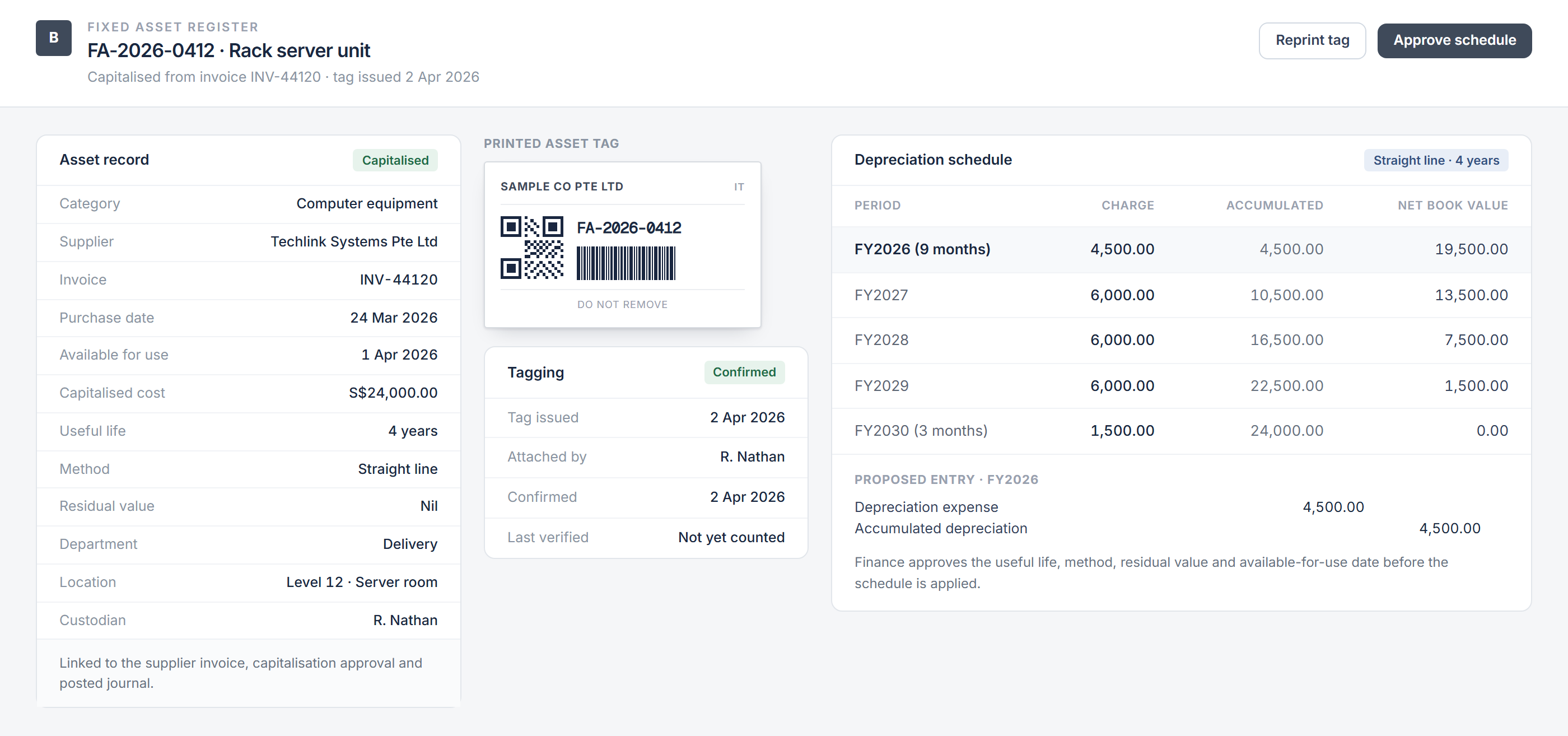
Once finance approves an asset record, the workflow creates a unique tag for physical labelling. The tag can carry a barcode or quick response code linked to the asset number.
The responsible employee attaches the tag and confirms its location. The workflow should distinguish between:
- a tag awaiting creation
- a tag issued but not yet attached
- a tag confirmed on the asset
- a damaged or missing tag requiring replacement
- an asset that cannot carry a physical tag
This status prevents an untagged asset from disappearing into a general exception list at the next count. It also gives finance a clear view of registration work that remains incomplete.
How does mobile scanning change the stock take?
Common audit practice for physical PPE verification includes confirming that the asset exists at its exact location and recording its condition. Printed lists make this slow because the employee must find the relevant row, write the result and return the document for later processing.
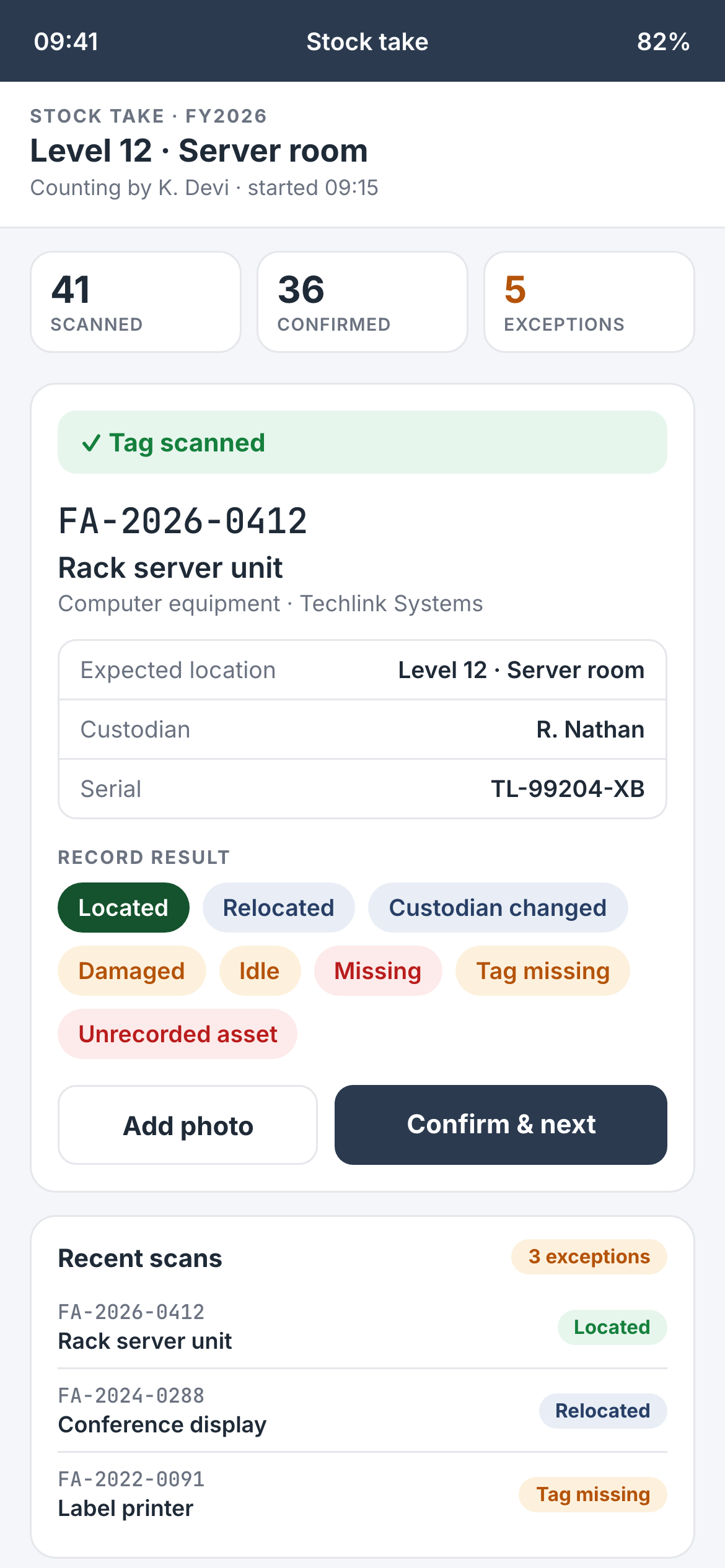
A mobile phone can scan the tag and retrieve the corresponding asset record. The employee then confirms the exact location and condition while standing beside the asset, with the date and verifier recorded against the result.
The same screen can capture a changed location, damaged machinery, a missing tag or an item that is not in the register. The evidence enters the stock take record immediately, reducing transcription and keeping documentation with the asset concerned.
What happens when the physical record does not agree?
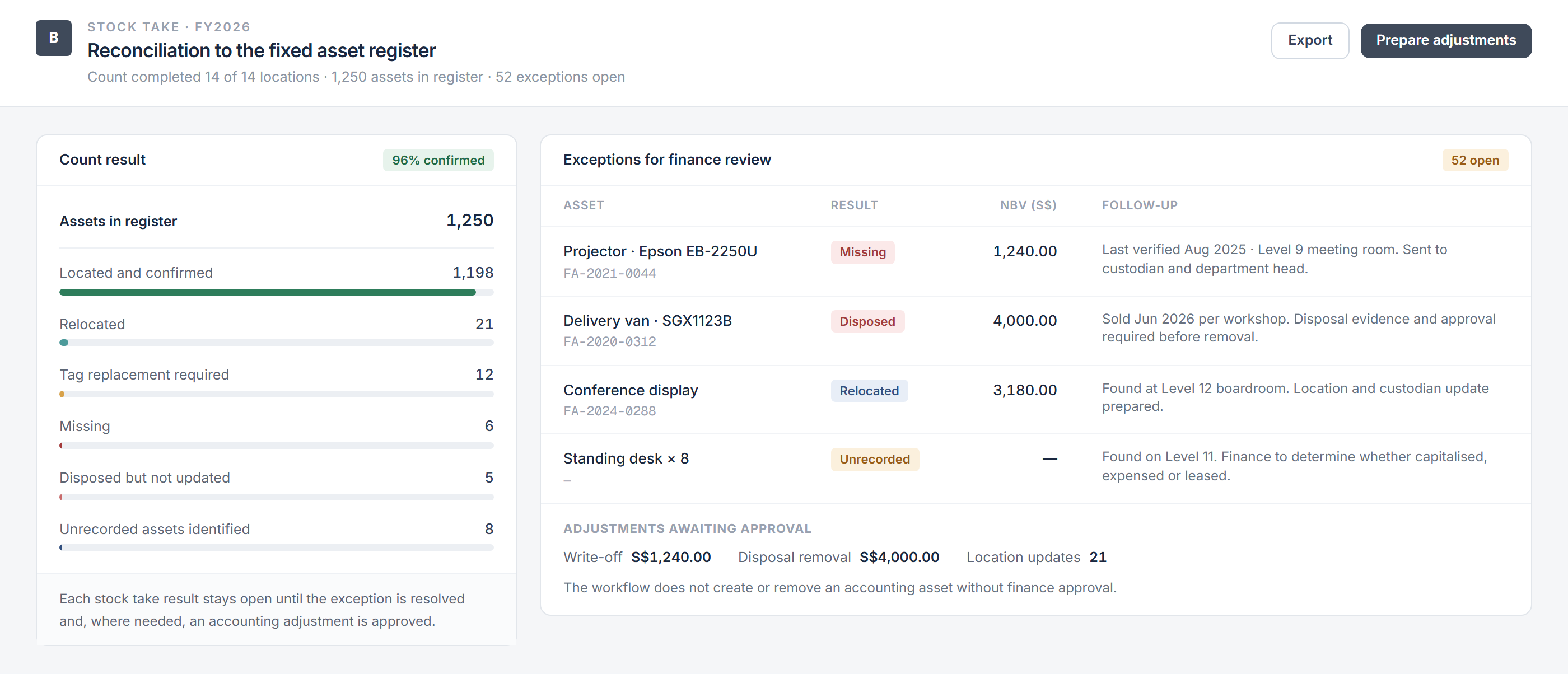
The workflow compares scan results with the stock take population. It separates confirmed assets from exceptions requiring investigation rather than treating the count as complete when the scanning stops.
The status report can group items as located, relocated, damaged, missing, untagged, disposed or unrecorded. It should show the recorded and observed locations, the condition reported, the verifier and any supporting note or photograph.
Finance and asset owners then resolve the differences. A relocation may require a register update, damaged machinery may require assessment, and an asset reported as disposed of needs approval and supporting evidence before finance changes the accounting record.
The resulting evidence can also support the process that turns client data into audit working papers. The auditor still determines the verification work required and evaluates the evidence obtained.
How does the connected workflow operate?
The workflow starts with an approved purchase or other authorised asset addition. It creates the asset record, applies the client's own depreciation policies and generates the tag used for physical labelling.
Approved transfers update the location, while condition reports and disposals remain attached to the same record. Before a stock take, the system creates the population by entity, location or asset category and tracks progress as employees scan each item.
After the count, the status report shows what has been verified and what remains unresolved. Finance reviews proposed register changes and accounting entries, while asset owners confirm physical movements and conditions.
Backbone helps finance and operations teams connect depreciation, asset tagging, mobile stock takes and status reporting in one controlled workflow — while keeping accounting decisions and physical responsibility with the organisation.
Frequently asked questions
This information has been prepared for general informational purposes only and is not intended to be relied upon as accounting, tax, or other professional advice.
Related articles
case-studies
From Headcount Plan to Payroll Forecast
How finance and people teams can maintain an employee-level payroll forecast as hiring, compensation and employer-cost assumptions change.
case-studies
From Historical Cash Movements to a Rolling Cash Flow Forecast
How finance teams connect bank balances, receivables, payables and planned commitments to maintain a rolling cash flow forecast.
case-studies
Pat: An AI Agent That Works Across Our Business
How an internal AI agent retrieves information, prepares routine work and coordinates approved actions across business systems while people retain authority.