How to Edit the Generated Financial Statements
How to edit your FS in Word: add rows, apply styles, and keep it clean.

Xian Hui
15 September 2025
Quick answer
How do I edit the generated financial statements in Word?
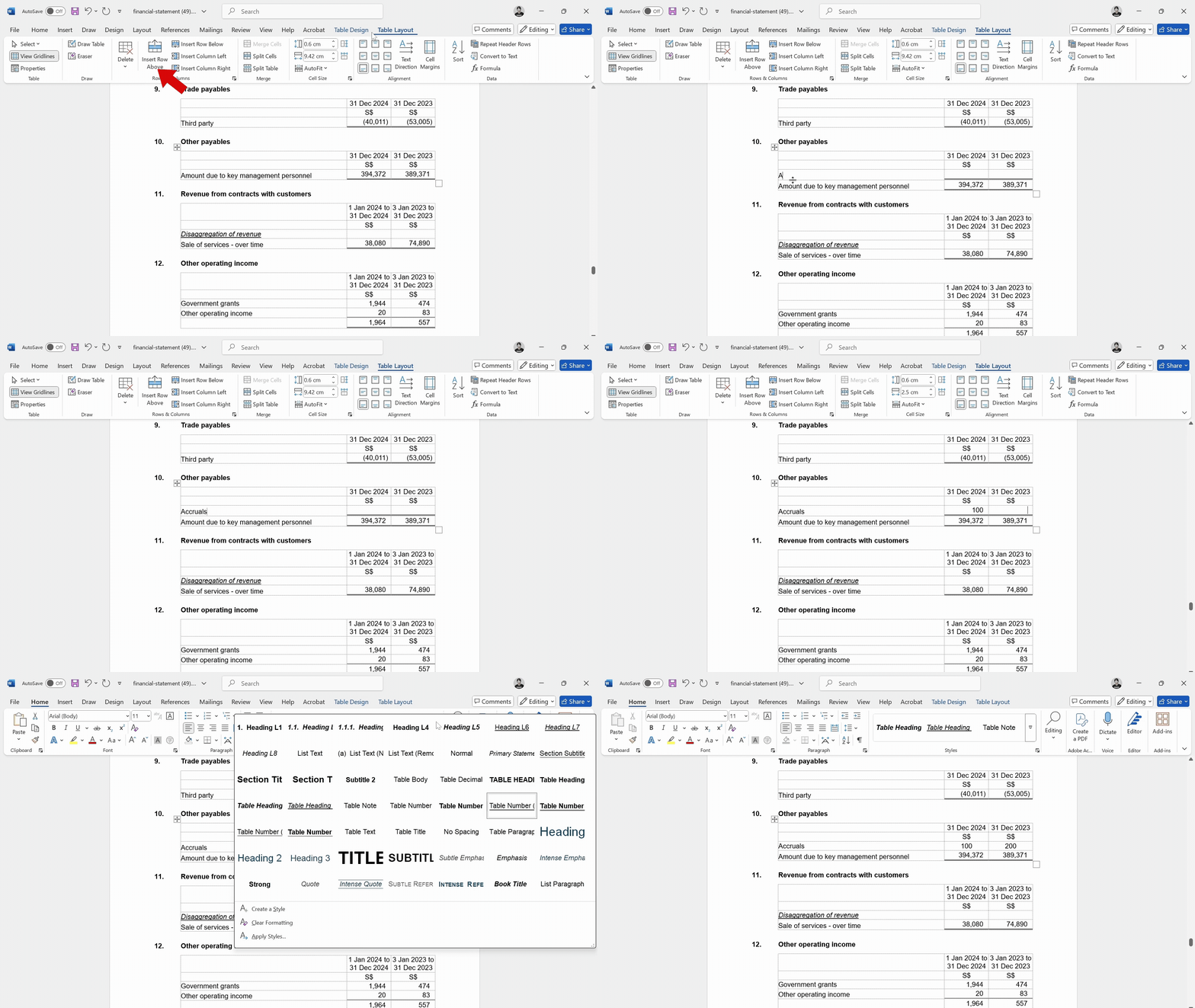
Download and open the .docx file generated by Luca. Navigate to the section you want to edit. To add rows in a table, click inside the table, go to the Table Layout tab, and use Insert Above or Insert Below. To match formatting, highlight the edited text, go to the Home tab, and apply the matching style from the Styles section.
How to Edit the Generated Financial Statements (FS) in Word
Once your financial statements (FS) are generated, they are output in a Word document format. While most of the content is auto-populated, you may still want to make manual adjustments. Here's how to do it easily.
Step-by-step guide
Open the FS Word File
Download and open the .docx file generated by Luca.
Navigate to the Section You Want to Edit
Scroll to the specific note, table, or paragraph you want to change.
To Add or Adjust Rows in a Table:
- Click anywhere inside the table.
- Go to the "Table Layout" tab in the ribbon.
- Use "Insert Above" or "Insert Below" to add a new row.
To Match Formatting with the Rest of the FS:
- Highlight the text or row you've edited or added.
- Go to the "Home" tab.
- In the Styles section, apply the style that matches the original formatting.
Tip
Avoid changing the structure unless necessary. If you frequently make similar changes, reach out to us — we may be able to automate it for you.
Watch the demo
Frequently asked questions
Related articles
support
How to Generate a Financial Statement
An overview of the seven-step process for generating a financial statement in Luca, from entering your UEN to downloading the finished Word document.
support
How to Use the File Upload Function
Our file upload feature is designed to make it easy for you to bring your accounting data into our platform, saving you time and effort when preparing financial statements.
support
What Files Do I Need to Prepare Financial Statements in Luca?
List of documents required for FS generation in Luca.